

 Up to 76% off with code




 Join our Discord!

STUDY & PODCASTS
Keep the focus on your words
Windowlight pairs warm piano with a relaxed lo-fi groove. Use this direction for a reading session or a quiet bed beneath narration.
WindowlightMake instrumentals online with TopMediai. Describe your genre, mood and instruments to create original backing tracks without vocals. Try the available free trial.


Give your video, study session or next verse a different musical feel. Try lo-fi keys, acoustic guitar, a cinematic build or a spacious beat.
Windowlight pairs warm piano with a relaxed lo-fi groove. Use this direction for a reading session or a quiet bed beneath narration.
Windowlight
Open Road Morning starts with acoustic guitar and light percussion. Try this direction for coastal footage, everyday stories and warm transitions.
Open Road Morning
Beyond the Ridge moves from intimate piano toward a broader orchestral theme. Try this direction for an adventure sequence or a game-world reveal.
Beyond the Ridge
Afterhours Circuit uses a sparse electronic groove as a starting point for flow practice. Record your own performance separately when the beat fits.
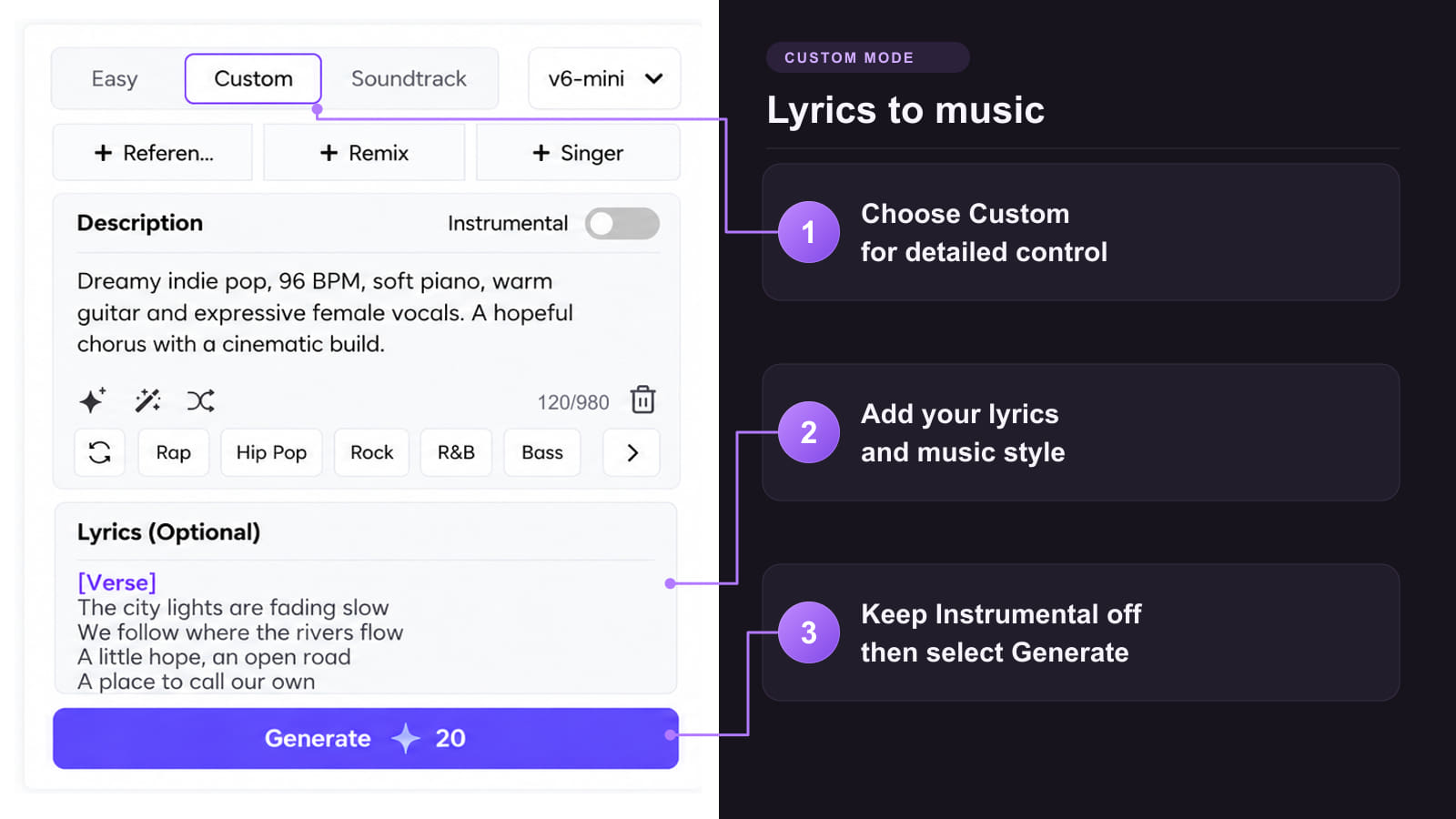
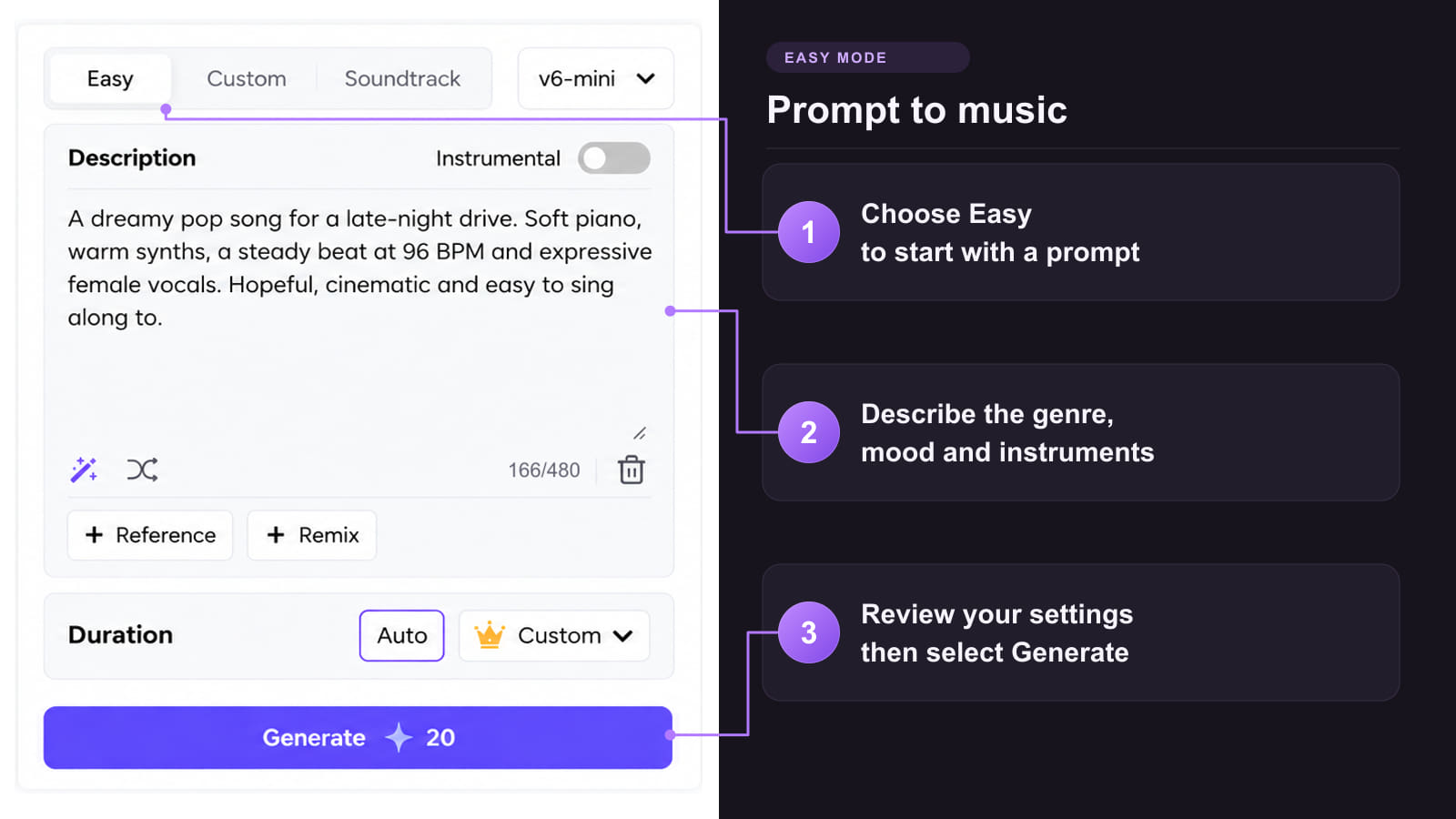
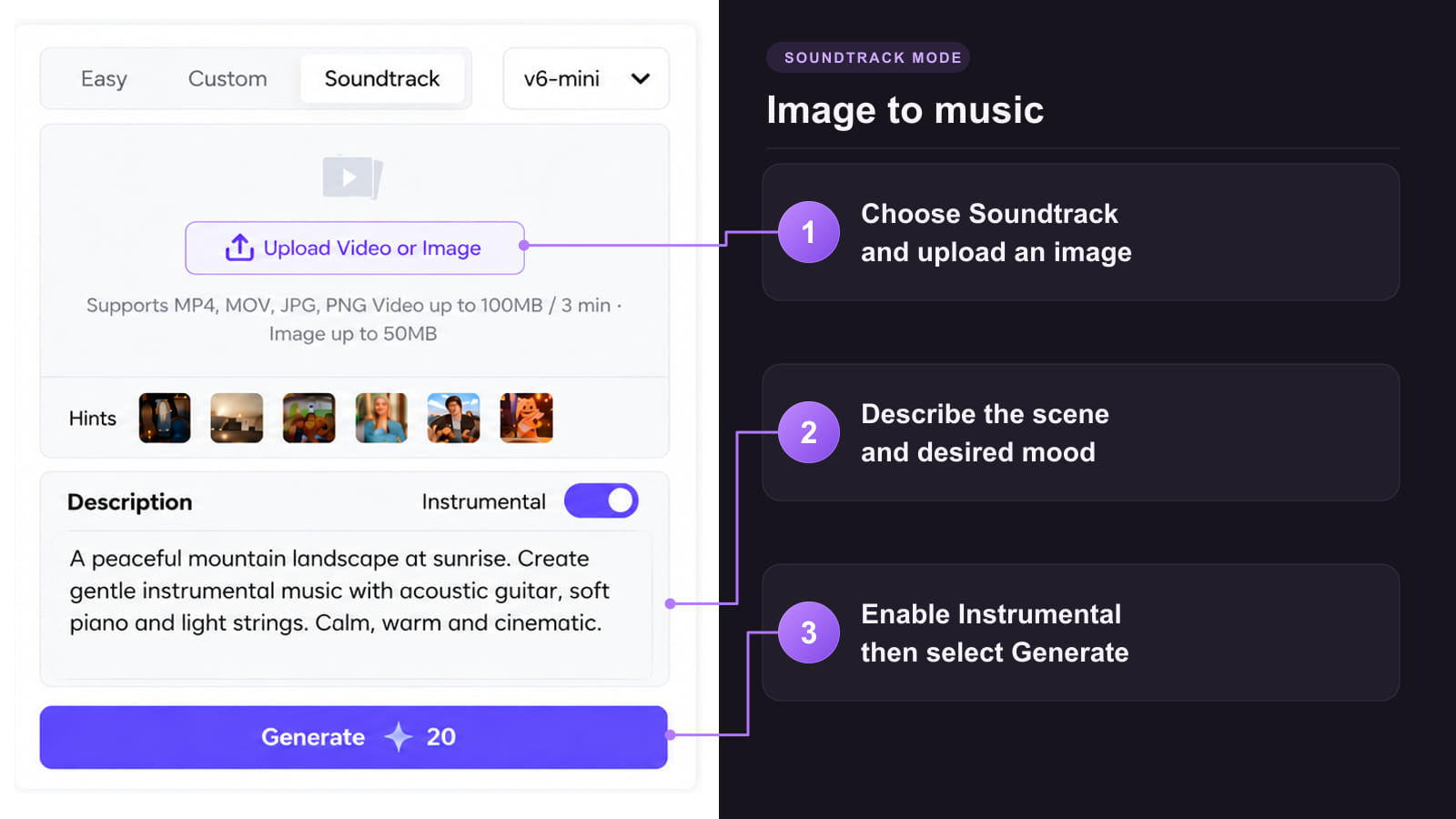
Afterhours CircuitStart with the mood, tempo and instruments you want to hear. Learn how to make instrumental music with a text prompt, then refine your idea in Custom mode or use visual inspiration in Soundtrack mode. Turn on Instrumental and leave the lyrics field empty for music without singing.
Method 1: Shape an instrumental in Custom mode
Method 2: Start with one clear prompt
Method 3: Use an image or video as inspiration

A useful prompt does more than name a genre. Tell the model what leads, what stays in the background and where the music needs to go.
 Plan for the way you will use it
Practice a melody at home or prepare music for a video project. Confirm the applicable track license before using the result commercially.
 Choose the instruments that matter
Start with a small palette: felt piano and brushed drums for focus, fingerpicked guitar for travel, or strings for a cinematic build.
 Refine the arrangement
If the first version feels crowded, ask for fewer lead phrases. If it feels flat, describe a gradual build. Preview changes before choosing a final track.
 Describe the space around the music
A podcast needs room for speech; a backing beat needs room for a lead. State that purpose in the description and check the mix in context.
 Choose an available V6 model
TopMediai currently lists V6 Pro, V6-wild Pro and V6-mini. Check the model options and displayed cost in your account before generating.
Explore the next step once your instrumental is ready. Vocal tools apply when you also have a vocal track; access and costs vary by feature.
Pair a short section of your instrumental with footage for a visual hook.
Explore Tool
Give a finished instrumental a visual direction and build a music video.
Explore Tool
Explore converting audio into MIDI for further arrangement.
Explore Tool
Need a song instrumental maker for existing audio? Separate vocals and accompaniment with Stem Splitter, using a source you have rights to.
Explore Tool
For a separate vocal version, explore animating a portrait with singing audio. A pure instrumental has no lyrics to lip-sync.
Explore Tool
Explore a different vocal interpretation when you have a vocal song and permission to use the source and voice.
Explore ToolExplore a style, sharpen your prompt or learn how to work with the audio after generation.
Answers about empty lyrics, existing songs, downloads and using your track.
Try Instrumental ModeIt creates new music without a sung lead from a text description. Start with a mood, a few instruments and a purpose, then choose Instrumental. Removing vocals from an existing recording is a separate task.
Turn on Instrumental, leave the lyrics field empty and describe the sound you want. Put the tempo, instruments and arrangement in the description. Generate a track and listen before deciding whether to refine it.
Yes. TopMediai offers a limited free trial. Check the account panel for the current allowance, available models and download access. Free access does not mean unlimited generation or a commercial license.
Use Stem Splitter to separate vocals and accompaniment from existing audio. Use the music generator when you want a new composition. Start with a recording you have permission to process, and review the separated result for artifacts.
Check that Instrumental is enabled and the lyrics field is empty. Remove singer or vocal-performance directions from the description, simplify the instrument list and compare another result. Listen through the whole track; the setting is not a substitute for checking the audio.
Yes. Include a target BPM and the instruments in your description, such as a relaxed 76 BPM groove with felt piano, brushed drums and bass. Treat these as creative directions and check the result, rather than assuming exact timing or notation.
Ask for a sparse arrangement with short melodic phrases and steady dynamics. Test it beneath your actual voice recording and lower the music until speech is clear. For an intro or montage without narration, a stronger lead melody may work better.
TopMediai lists MP3 and WAV among its available download formats. Check the download menu for the selected track and plan. MIDI conversion and stem separation are separate production options, rather than the same thing as an audio download.
Eligible tracks generated during a paid membership include a commercial license. Keep the PDF license certificate and review its terms for your intended use. Free-plan tracks are for personal, non-commercial use; do not assume a later upgrade changes an earlier track license.