


 Join our Discord!


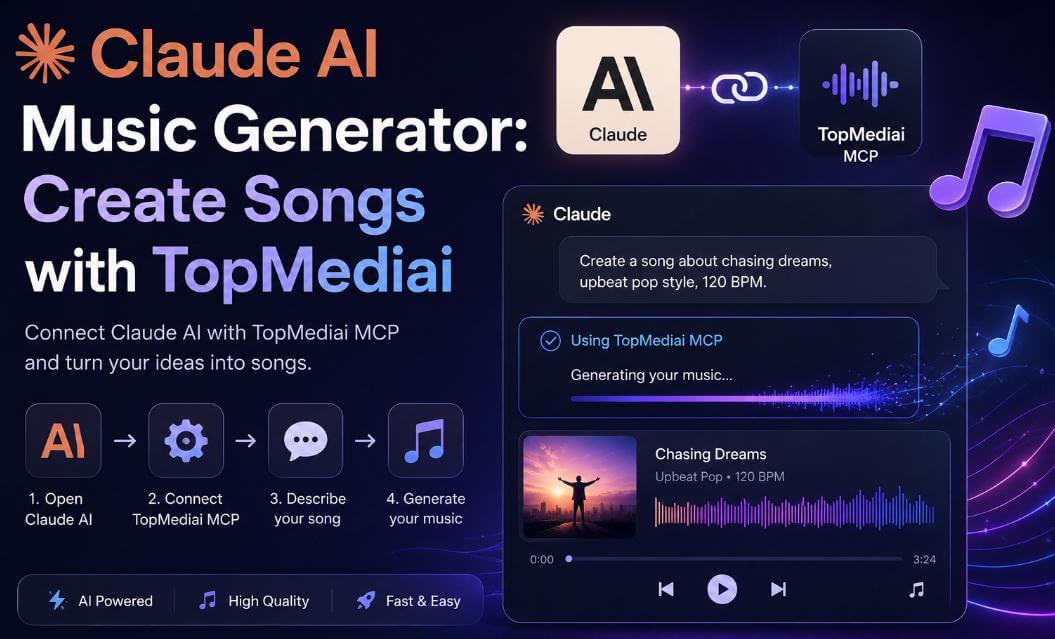
Claude AI Music Generator workflows are changing how creators make audio by combining AI planning with real music generation tools. The same agent pattern appears in music production, and the AI music agent workflow is a related resource. Claude can help write lyrics, refine prompts, and prepare music ideas, while TopMediai AI Music Generator helps turn those ideas into songs or background music for videos, podcasts, ads, games, and social media content. TopMediai MCP is coming soon and will make this agent workflow even smoother.
- Part 1: What Is a Claude AI Music Generator?
- Part 2: Why Use TopMediai for Claude Music Generation?
- Part 3: How to Use Claude as an AI Music Generator
- Part 4: How to Build a Better Claude AI Music Workflow
- Part 5: FAQs About Claude AI Music Generator
Part 1: What Is a Claude AI Music Generator?
A Claude AI music generator is a workflow that uses Claude as the creative agent for music creation. Claude can understand your song idea, write lyrics, improve a prompt, choose a genre direction, and organize the steps needed to create music.
However, Claude does not generate finished audio by itself. To create real music files, Claude needs a dedicated music generation tool. This is where TopMediai AI Music Generator is useful.
Note
MCP stands for Model Context Protocol. TopMediai MCP is planned as a coming-soon integration that will allow AI agents and MCP-compatible clients to connect with TopMediai tools more directly. Learn what an AI agent for phone control is, how voice-controlled mobile agents work, and why tools like FoneClaw are changing hands-free mobile automation.
Here are three major benefits of using Claude with a music generation tool:
Easy music planning - Claude can turn rough ideas into structured prompts and lyrics.
Fast creative workflow - TopMediai can generate music after Claude prepares the direction.
Flexible content creation - Create audio for videos, ads, podcasts, games, and social media.
Part 2: Why Use TopMediai for Claude Music Generation?
TopMediai turns Claude's creative planning into real audio output. Instead of stopping at lyrics or prompt ideas, creators can use TopMediai AI Music Generator to create songs, background music, and audio drafts from Claude-polished prompts. Once your idea is clear, the AI Music Generator API takes care of the production side.
1 TopMediai AI Music Generator - Best for Claude Music Workflows
TopMediai AI Music Generator helps users create AI songs, lyrics, and background music from text prompts, styles, or song ideas. It is a natural fit for Claude workflows because Claude can improve the prompt before TopMediai generates the track.
How to Use TopMediai AI Music Generator with Claude:
Step 1: Open Claude and describe the music you want to create. Include the use case, such as a YouTube intro, TikTok video, podcast opening, game background track, or product ad.
Step 2: Ask Claude to turn your idea into a clear music brief. The brief should include genre, mood, tempo, instruments, vocal direction, target length, and the platform where the music will be used.
Step 3: Open TopMediai AI Music dashboard and paste the Claude-polished prompt or lyrics into the creation box.
Step 4: Generate the first version of your track. Listen carefully and note what needs improvement, such as the intro speed, chorus energy, instrument style, or overall mood.
Step 5: Return to Claude with your feedback and ask it to rewrite the prompt for a better version. Then regenerate the music in TopMediai until the result fits your content.
Generate music from text descriptions, lyrics, moods, and genres.
Use Claude to refine song structure, chorus ideas, and prompt details.
Create background tracks for videos, podcasts, games, ads, and social media.
Coming soon: connect with MCP-compatible AI clients for agent-style workflows.
2 TopMediai MCP Workflow
Coming Soon: TopMediai MCP is planned as a future workflow for Claude and other MCP-compatible clients. For now, creators can use Claude to write lyrics and polish prompts, then use TopMediai AI Music Generator directly to create the final music.
Part 3: How to Use Claude as an AI Music Generator with TopMediai
Before TopMediai MCP officially launches, the practical workflow is simple: use Claude to create or refine the music direction, then paste the final prompt or lyrics into TopMediai AI Music Generator.
Step 1: Ask Claude to Create a Music Brief
Describe your video, podcast, ad, or song idea. Ask Claude to define the genre, mood, instruments, lyrics direction, and ideal length.
Step 2: Refine the Prompt with Claude
Let Claude turn your rough idea into a clear TopMediai-ready prompt, including style, rhythm, emotion, vocals, and use case.
Step 3: Generate Music in TopMediai
Open TopMediai AI Music Generator and paste the Claude-polished prompt or lyrics into the music creation box.
Step 4: Use a Clear Prompt Format
Keep the prompt specific so TopMediai can better understand the music direction.
Prompt Example
Generate an upbeat electronic song for a 30-second product video.
The mood should be energetic, futuristic, and clean.
Include a short hook and make it suitable for social media ads.
Step 5: Listen, Download, or Regenerate
After TopMediai generates the track, listen to the result and ask Claude to rewrite the prompt if you want a different mood, genre, or structure.
Part 4: How to Build a Better Claude AI Music Workflow
Claude is most useful before the actual music generation step. It can help you turn a vague idea into a clear creative brief, organize lyrics, define the sound direction, and prepare a more accurate input for TopMediai AI Music Generator.
1 Start with the Content Goal
Before asking Claude to write lyrics or describe a track, define where the music will be used. A YouTube intro, podcast transition, game loop, TikTok video, and product ad all need different pacing, structure, and emotional intensity.
For short videos, keep the music direct, catchy, and easy to recognize in the first few seconds.
For podcasts or tutorials, choose music that supports attention without distracting from speech.
For games or background scenes, ask Claude to focus on mood, loopability, and atmosphere.
2 Let Claude Separate Lyrics, Style, and Use Case
Many weak music outputs come from overloaded instructions. A better workflow is to let Claude split your idea into three parts: lyrics or theme, music style, and final use case. This makes it easier to edit each part before generating the track.
Clarify the use case before generating music.
Ask Claude to define genre, mood, tempo, instruments, and vocal direction separately.
Review the lyrics or theme before sending the final idea to TopMediai.
Generate one version first, then refine based on what feels too slow, too busy, or off-brand.
3 Avoid Common Music Prompt Mistakes
When using Claude and TopMediai together, avoid asking for too many styles at once. A prompt like “make it cinematic, cute, dark, upbeat, retro, emotional, and futuristic” gives the generator mixed signals. It is better to choose one primary mood and one supporting style.
Do not mix too many genres in one request.
Do not forget the target length or platform.
Do not ask for a full song if you only need a short background track.
4 Use Claude for Iteration After Generation
After TopMediai generates a track, Claude can still help. Describe what you want to change, such as “the intro is too slow,” “the chorus needs more energy,” or “the track feels too dramatic for a product tutorial.” Claude can then rewrite the music direction for a second version.
Part 5: FAQs About Claude AI Music Generator
1 Can Claude generate music by itself?
Claude can write lyrics, song concepts, and music prompts. To generate actual audio, use a dedicated music generation tool such as TopMediai AI Music Generator.
2 Is TopMediai MCP available now?
Not yet. TopMediai MCP should be introduced as a coming-soon workflow. For now, the recommended path is to use Claude for prompt planning and TopMediai AI Music Generator for music creation.
3 What will TopMediai MCP be used for?
TopMediai MCP is planned to help MCP-compatible AI clients connect with TopMediai tools more directly, making agent-based music workflows easier in the future.
4 Do I need coding skills to use Claude with TopMediai?
No. You can ask Claude to prepare a music prompt, then paste that prompt into TopMediai AI Music Generator. MCP setup is only relevant after the integration officially launches.
5 Can I use the generated music commercially?
TopMediai is designed for creators who need music for videos, podcasts, ads, and other projects. Always check the latest TopMediai terms and license rules before commercial use.
ConclusionClaude AI Music Generator workflows are a practical way to combine agent planning with real audio creation. Claude can shape the song idea, lyrics, and prompt details, while TopMediai AI Music Generator helps turn those ideas into usable music for videos, podcasts, games, ads, and social media. TopMediai MCP is coming soon and can be introduced as the next step for agent-based music workflows.
Secure Visit

