


 Video Generation Types
 Supported AI Models
 AI Video Effects



 AI Video Tools
 AI Music Tools
 AI Voiceover Tools
 More Features
 API for Music-related Services
 API for Voiceover-related Services

 TopMediai's API Documentation:

 Help&Support
 Popular Tips


 Join our Discord!

 Text to Speech


The RVC AI technology has revolutionized the way we interact with AI-generated voices. Gone are the days of robotic and unnatural vocalizations; RVC brings a new level of realism to artificial voices, making them virtually indistinguishable from human speech.
Here is a guide of how to make RVC AI Voice. This article will also further explore RVC V2 and how you can harness RVC AI Voice Models power to clone voices, make AI cover RVC or RVC AI text to speech.
Secure Visit
- Part 1: What is RVC AI and RVC V2?
- Part 2: How Does RVC AI Work?
- Part 3: How to Create Your Own RVC AI Models?
- Part 4: How to Use Latest RVC AI Voice Models?
- Part 5: Hot FAQs about RVC AI
Part 1: What is RVC AI and RVC V2?
RVC AI stands for Retrieval-based Voice Conversion Artificial Intelligence. It is a technology designed to convert one person's voice into another's, leveraging machine learning models and retrieval-based methods for high-quality voice synthesis. It’s commonly used for applications such as music covers, voiceovers, and dubbing. RVC AI achieves realistic results by learning the timbre and tonal qualities of a target voice from training data.
RVC V2 is the second version or an upgraded iteration of RVC AI. It typically includes improvements over the original version, such as Higher Accuracy, Faster Processing and Reduced Noise.
Part 2: How Does RVC AI Work?
The working principle of RVC AI involves several complex technical layers, and understanding these requires a certain level of expertise.
Feature Extraction: First, RVC AI extracts key features from the source voice, such as Mel-frequency cepstral coefficients (MFCCs) and vocal tract features, which help the model understand the voice's quality and pronunciation characteristics.
Inverse Vocoder Encoding (Vocoding): The extracted features are then mapped to target voice features through an inverse vocoder encoding process (Vocoding), enabling the voice conversion.
Neural Network Training: AI uses deep neural networks (such as CNNs and LSTMs) to train on vast amounts of speech data, learning how to accurately convert the source voice into the target voice.
Speech Synthesis: Finally, the converted target features are synthesized into realistic speech using generative models like WaveNet, restoring the original voice's emotion and quality.
These technologies and processes sound complex and require significant computational power. Training the models typically needs high-performance computing devices, such as GPU servers, and can take several days or even weeks of processing to achieve satisfactory results.
Part 3: How to Create Your Own RVC AI Models?
Although RVC AI is complex, many user-friendly models and platforms are now available. These platforms feature intuitive interfaces and preset models, allowing anyone to easily perform high-quality voice conversion without technical expertise. Try them now—upload your voice, change its pitch, and customize it effortlessly!
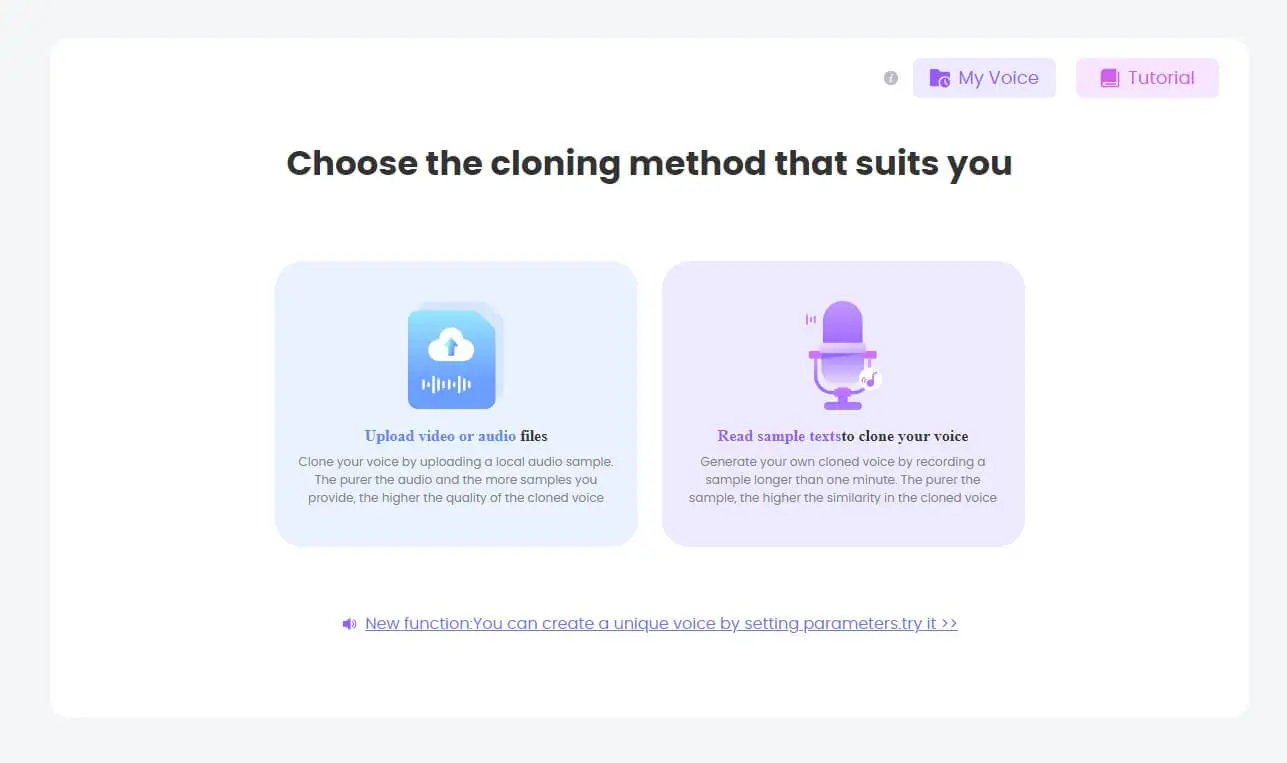
1 TopMediai AI Voice Cloning - Create RVC AI Model
TopMediai AI Voice Cloning offers an intuitive platform that allows you to make RVC AI models effortlessly, especially RVC v2 models. Simply provide a sample of your voice, it will generate a high quality RVC model of the voice that you provide.
Secure Visit
Part 4: How to Use Latest RVC AI Voice Models?
1 TopMediai Text to Speech - RVC AI Text to Speech
In addition to using RVC Voice Clone to directly clone voice, RVC model can also be used for generating RVC AI text to speech voice.
TopMediai Text to Speech is a versatile platform that lets you craft AI-generated voices for a myriad of applications. It is installed with the latest RVC v2 model. You can select the voice you want to convert RVC text to speech and enter the text, and it can easily help you generate high-quality, realistic AI voice including rvc v2.
Don't hesitate to generate AI voice, it faster beyond imagination. More than 3200 voices generated by RVC voice models are waiting for you.

How to use RVC AI text to speech?
Step 1: Access the TopMediai Text to Speech's official dashboard. (No sign up or log in needed)
Secure Visit
Step 2: Input your text.
Step 3: Select an AI voice you are interested in.
Step 4: Generate your text to speech audio using RVC AI voice.
Step 5: Preview and download the audio.
High-quality output with diverse formats: mp3, wav, etc.
Text to Speech API access for developer to integrate.
Supports adjusting voices, and real-time text to speech.
More than 190 languages and accents supported.
You can custom your voice in 4 modes, fast and convenient.

TopMediai Text to Speech - Realistic AI Voice Generator
No need to hire a voice actor anymore! Built for content creators, our text to speech saves your time and money.
More Voice Tips:
2 Voice.ai - Vocal AI RVC
Voice.ai's RVC Voice Changer is an AI-driven tool that allows users to transform their voice in real time using pre-trained or custom voice models. It offers precise voice mimicking and customization, making it ideal for content creators, streamers, and gamers. This realtime AI voice changer using RVC supports cross-platform integration, making it easy to use across various applications.

Part 5: Hot FAQs about RVC AI
1 Can I use RVC AI to convert voices into any language?
Yes, RVC AI works with multiple languages, but the accuracy depends on the model's training data. Major languages are well-supported, while niche languages or dialects might be less accurate.
2 Is RVC AI safe to use for creating synthetic voices?
Yes, RVC AI is safe for creative uses like virtual assistants or audiobooks. However, always ensure you have permission to use someone else's voice to avoid privacy and consent issues.
3 Do I need to be an expert to use RVC AI platforms?
No, most RVC AI platforms are user-friendly and require no technical knowledge. Simply upload your voice and adjust settings with a few clicks.
4 Can I create a voice that sounds exactly like a celebrity or public figure using RVC AI?
Yes, advanced models can replicate celebrity voices, provided there's enough speech data. Use responsibly and avoid unethical practices like impersonation.
Conclusion
RVC AI voice made by RVC AI is a popular technology that can help you make content funny. Whether you want to generate RVC AI voice, change your voice to sound like somebody, RVC AI has the tools and capabilities to make it happen. And there are many tools above, hope it will be useful for you.
Come and explore RVC V2 today for free! It's not that mysterious!
Secure Visit

-

February 24, 2026
TopMediai Coupon Code: Save on All AI Tools with One Plan -

January 29, 2026
Super Bowl AI Voice: Create Viral Game-Day Content -

January 26, 2026
Best Santa Video for Kids in 2026: Create Magical Christmas Messages -

January 26, 2026
How to Use Grok Imagine: Free Tutorials & Best Alternatives -

January 26, 2026
Best 5 AI News Generators to Produce News Articles & Videos
Recent Blogs


