


 Video Generation Types
 Supported AI Models
 AI Video Effects



 AI Video Tools
 AI Music Tools
 AI Voiceover Tools
 More Features
 API for Music-related Services
 API for Voiceover-related Services

 TopMediai's API Documentation:

 Help&Support
 Popular Tips


 Join our Discord!

 Text to Speech


Many people feel uneasy when speaking on camera, often struggling to maintain natural eye contact. With the help of AI eye contact filters, your videos can appear more confident and engaging. In this article, we’ll explore some of the best AI eye contact free options and even try eye contact AI free online.
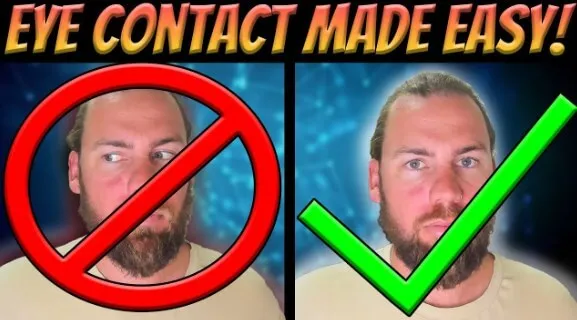
Table of Contents
- Part 1: Best 3 AI Eye Contact Correction Online Free Recommended
- Part 2: Bonus: Other Free Tool to Correct Your Video
- Part 3: What can Eye Contact AI Help You?
- Part 4: FAQs about AI Eye Contact Correction Online Free
Part 1: Best 3 AI Eye Contact Correction Online Free Recommended
1 Captions
Site: https://www.captions.ai/eye-contact
Captions is a standout AI eye contact software renowned for its real-time gaze correction capabilities. Compatible with major video conferencing platforms, Captions seamlessly integrates into your virtual meetings, ensuring that your eye contact remains focused and natural.
With its user-friendly interface and minimal setup requirements, Captions is an excellent choice for professionals seeking to enhance their online presence during virtual collaborations.

Real-time Eye Contact Correction
Allows content creators to match captions with their brand aesthetics.
Option to fine-tune captions for accuracy and clarity.
Compatible with various video formats and platforms.
- Real-time eye contact correction works smoothly.
- Easy setup with minimal technical requirements.
- Integrates well with video conferencing platforms.
- User-friendly interface for quick adoption.
- Supports various video formats.
- Limited advanced editing features.
- Works best with stable internet.
- Free plan has restrictions on usage time.
2 Descript
Site: https://www.descript.com/eye-contact
Descript takes video editing to the next level by incorporating AI-driven eye contact correction features. This platform is perfect for content creators who prioritize simplicity and efficiency in their video production process.
Descript's intuitive interface allows users to effortlessly refine their videos, adjusting eye contact with precision. As a versatile tool with both basic and advanced editing options, Descript empowers creators to achieve a polished and engaging visual experience.

Easily transcribes audio and video recordings for efficient editing and eye contact correction.
Unique real-time editor for visualizing and editing eye contact.
Works seamlessly with popular editing tools like Adobe Premiere Pro and Final Cut Pro.
Enables the creation of professional-looking videos with improved AI eye contact and engagement.
- AI-driven eye contact correction is precise.
- Strong transcription and audio-to-text features.
- Simple interface that suits beginners.
- Compatible with Adobe Premiere Pro and Final Cut Pro.
- Real-time editor allows efficient adjustments.
- Advanced features locked behind paid plans.
- Requires good system resources for smooth performance.
- Steeper learning curve for advanced editing options.
3 Veed.io
Site: https://www.veed.io/tools/eye-tracking-software/eye-contact-ai
Veed.io stands out as a comprehensive AI eye contact solution, offering powerful editing tools and advanced AI algorithms. This platform caters to users seeking versatility and creativity in their video content. Veed.io's intuitive features make it easy to correct eye contact while providing additional options for video enhancement.
Whether you're a beginner or an experienced content creator, Veed.io offers the flexibility and precision needed to perfect your on-screen presence.

One click to automatically correct eye contact in videos.
Allows content creators to fine-tune eye contact correction results.
Includes options for adding captions, subtitles, and annotations for an enhanced viewer experience.
Compatible with various video formats and platforms, catering to diverse content creators.
- One-click automatic eye contact correction.
- Flexible for both beginners and advanced users.
- Offers captions, subtitles, and annotations.
- Wide compatibility with different video formats.
- Strong online accessibility with no heavy installation.
- Includes creative editing tools beyond gaze correction.
- Free version adds watermarks to exports.
- Rendering speed can be slow with large files.
- Limited offline functionality.
- Some features require a premium subscription.
Part 2: Bonus: Other Free Tool to Correct Your Video
1 TopMediai Text to Speech – Perfect for Awkward On-Camera Speakers
Apart from AI eye contact correction software, there are other tools that can help you enhance your video content. One such tool is TopMediai Text to Speech. This online platform converts text into natural-sounding speech, making it ideal for adding voiceovers to your videos.
It can help you create engaging and professional-looking videos even if you're not comfortable speaking directly into the camera.

How to make speaking without opening mouth:
Step 1: Visit TopMediai official website and access to Text to Speech.
Secure Visit
Step 2: Click the avatar to choose a voice models suits your speaking, and click "use" to start.
Step 3: Input the text you want to speak in your video and click "Generate Speech" to generate your speaking.
Step 4: After converted, you can listen to your generated voice and download it.
Supports more than 190+ languages and accents.
3200+ realistic voice options to choose from, including celebrity, anime and more.
It allows you to adjust volume, pitch, and emphasis to create natural-sounding effects.
Users can use voice cloning to make their own unique voices.
Easily change emotions of your chosen voice.
- High-quality and natural voices are stored for everyone.
- Quick results will generate within few seconds.
- Text to Speech API access for developers.
- Voices and service regular updates.
- Support multi-person dubbing projects.
- Free trial included.
- Need a network connection.

TopMediai Text to Speech - Realistic AI Voice Generator
Built for eye correction contacts, it's time-saving and affordable.
Part 3: What can Eye Contact AI Help You?
Video Conferencing: In a professional setting, maintaining eye contact during virtual meetings is crucial for effective communication. AI eye contact software can help you present yourself confidently and engage with your audience.
Vlogging and Content Creation: Whether you're a seasoned vlogger or just starting out, AI eye contact software can improve the quality of your videos. It helps you connect with your audience on a deeper level by creating a more engaging viewing experience.
Online Courses and Tutorials: Teachers and instructors rely heavily on eye contact to establish a connection with their students. With AI eye contact software, educators can maintain a strong presence in their instructional videos and enhance student engagement.
You May Also Like:
Faceless AI Video Generator: How to Create Faceless Videos with AI
Part 4: FAQs about AI Eye Contact Correction Online Free
1 What is AI eye contact correction?
AI eye contact correction is a technology that utilizes artificial intelligence algorithms to adjust and enhance eye contact in images or videos, making it appear more natural and engaging.
2 What is the AI tool that keeps eye contact?
The AI tool that keeps eye contact is typically referred to as eye contact correction software. This type of tool uses artificial intelligence to modify video footage in real-time, ensuring that the speaker appears to maintain eye contact with the viewer, even if they are looking elsewhere, such as at a script or another part of the screen.
3 Can AI eye contact online free be used for pre-recorded videos?
Yes, AI eye contact online can be used for pre-recorded videos as well. It allows you to enhance the eye contact in recorded videos, making them more engaging and natural.
4 Can AI eye contact software work with any video conferencing platform?
Yes, most AI eye contact software such as Veed.io, descript and captions can be integrated with popular video conferencing platforms such as Zoom, Microsoft Teams, Google Meet, and others.
5 Can AI eye contact correction be applied to both images and videos?
Yes, many AI eye contact correction tools support both images and videos, offering a versatile solution for content creators.
Conclusion
With tools like Captions, Descript, and Veed.io, adjusting your gaze with AI eye contact correction online free has become simple and accessible. You can also combine these with TopMediai Text to Speech to add clear narration and improve the overall quality of your videos.
Don’t let discomfort in front of the camera limit your content—try an AI eye contact software or AI eye contact correction online free to make your videos feel more natural and engaging.
TopMediai Text to Speech
Add clear narration and improve the overall quality of your videos!

-

February 24, 2026
TopMediai Coupon Code: Save on All AI Tools with One Plan -

January 29, 2026
Super Bowl AI Voice: Create Viral Game-Day Content -

January 26, 2026
Best Santa Video for Kids in 2026: Create Magical Christmas Messages -

January 26, 2026
How to Use Grok Imagine: Free Tutorials & Best Alternatives -

January 26, 2026
Best 5 AI News Generators to Produce News Articles & Videos
Recent Blogs


