

 Up to 76% off with code




 Join our Discord!

 Text to Speech


AI sound effects are transforming how audio content is created, making it easier than ever to find high-quality sound effects for various applications. ElevenLabs is one of the leading AI sound effects tools, providing advanced features for creating professional-level audio.
In addition to ElevenLabs, this article introduces other AI sound effects tools so you can compare options and pick the right one for your project needs.

Part 1: 5 Best AI Sound Effects Tools Compared
1 ElevenLabs: Premium AI Sound Effects for Film & Ads
ElevenLabs offers a robust AI sound effect feature that allows users to create high-quality sound effects directly from text descriptions. This platform is designed for audio professionals and content creators who need realistic audio for various applications, including films, games, and podcasts. With its advanced AI capabilities, ElevenLabs provides an intuitive way to generate AI sound effects quickly and efficiently.

Convert detailed text descriptions into realistic sound effects.
Produces clear and professional-quality audio suitable for any project.
Generates sounds within seconds, enhancing workflow efficiency.
Use generated sounds in projects without worrying about royalties.
Simple setup for quick access to sound generation.
-
Text to Sound Effects.
-
High-Fidelity Audio.
-
High-quality output that enhances audio projects.
-
Quick generation time improves productivity.
-
No additional costs for using generated sounds.
-
Requires an internet connection for access.
2 PopPop AI: Free AI Sound Effects for Casual Use
PopPop.ai is a versatile text-to-sfx online tool that transforms text into captivating sound effects across various categories. This free AI sound effects tool allows users to create everything from ambient noises to special effects, making it suitable for diverse projects like video production and gaming. With its extensive library and user-friendly design, PopPop.ai caters to both casual users and professionals alike.

Includes human sounds, ambient noises, musical instruments, and special effects.
Enhances user descriptions for richer audio output.
Generate sound effects ranging from 10 to 60 seconds.
Ensures superior audio quality for all generated sounds.
Works on Windows, macOS, Android, and iOS devices.
-
Diverse Categories of Sounds.
-
Flexible Duration Options.
-
High-Quality WAV Output.
-
Cross-Platform Compatibility.
-
Completely free to use with no hidden fees.
-
Limited advanced editing features compared to dedicated audio software.
-
Longer download times due to high-quality WAV files.
3 MyEdit: Browser-Based AI Sound Effects Software
MyEdit offers an intuitive online editor with an integrated AI sound effects feature, allowing users to create and edit audio seamlessly. The tool is designed for content creators who require both editing capabilities and the ability to generate AI sound effects quickly. With its focus on usability, MyEdit makes it easy to produce engaging audio for various applications.

Combines sound generation with editing features in one platform.
Allows users to tweak parameters for tailored outputs.
Easily download generated sounds in multiple formats.
Simplifies the process of creating and editing audio content.
Offers flexibility in how users can export their work.
-
Supports Various Audio Formats.
-
Combines generation and editing capabilities in one platform.
-
Customizable Sound Effects Generation.
-
Easy-to-use interface suitable for all skill levels.
-
Quick export options enhance workflow efficiency.
-
Some features may require a subscription plan.
-
The interface can be overwhelming for new users.
4 ClipMove: Quick AI Sound Effects for Short-Form Video
ClipMove provides an online platform for generating realistic sound effects using an AI-powered text-to-sfx tool. Users can input text descriptions of the desired sound, and the AI will create audio that mimics real-world scenarios. This tool is ideal for creators looking for a straightforward way to produce AI sound effects quickly.

Creates a wide range of sounds based on user input.
Produces audio clips in approximately 30 seconds.
Capable of generating natural, environmental, and action sounds.
Simple three-step process to create sounds.
Offers free use of the generator without hidden fees.
-
Realistic Sound Generation.
-
Wide Variety of Sounds.
-
Generates highly realistic sound effects.
-
Easy to use with a clear interface.
-
Free to access with no limitations on usage.
-
May lack some advanced features found in dedicated audio editing software.
-
Limited voice options compared to specialized voice generators.
5 TopMediai: Upcoming AI Sound Effects Suite(Coming Soon)
TopMediai is planning to roll out an AI sound effects feature. TopMediai has been committed to providing users with AI tools to achieve more efficient video creation. This AI sound effects suite is also a cutting-edge tool designed for creators seeking to enhance their projects with high-quality sound effects. Whether you’re working on videos, games, or podcasts, this suite offers an extensive library of customizable audio clips, powered by advanced AI technology. But so far, it is still under construction, please stay tuned. Once live, you can use our AI sound effect generator to create custom SFX in seconds.
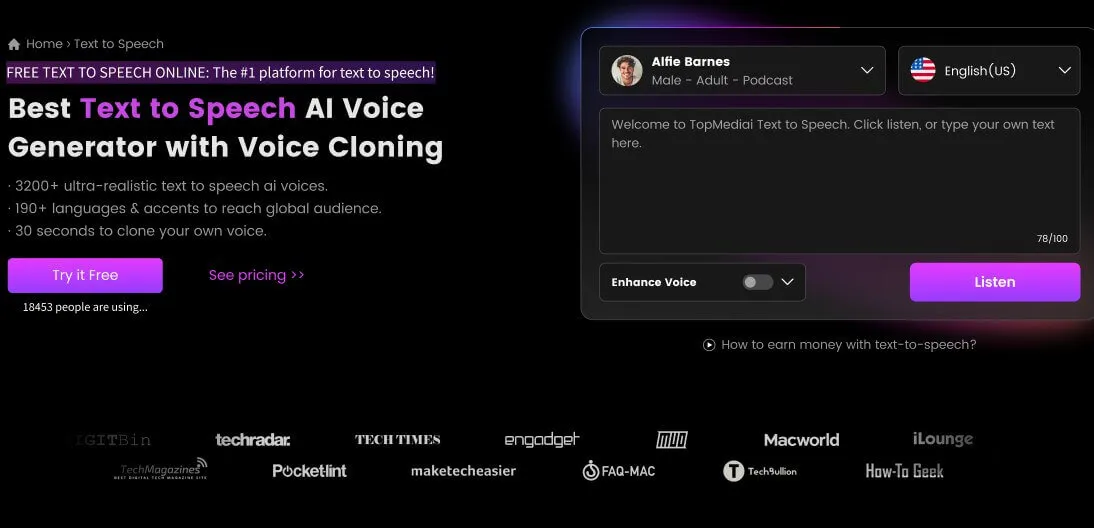
Access a wide variety of sound effects across multiple categories, including nature, urban, sci-fi, and more.
Easily download and integrate sound effects into your projects in various formats.
Tailor sound effects to fit your project’s specific needs, adjusting parameters like pitch, duration, and intensity.
Supporting 190+ languages's sound effect generation.
User-Friendly Interface makes it easy to navigate and find the perfect sound for your creation.
-
Suitable for diverse applications, from gaming to film production.
-
Smart customization options enhance creativity and save time.
-
A vast array of sounds ensures you find exactly what you need.
-
Designed for users of all skill levels, making sound design accessible.
-
Quick Export Options.
-
Requires a stable internet connection for optimal functionality.
Bonus: Royalty-free AI Sound Effects Download
If you're looking for royalty-free AI sound effects, the Pixabay website is an excellent resource. It offers a wide selection of downloadable sound effects that you can use without worrying about copyright issues. With it, you can obtain royalty-free sound effects directly, rather than generating them.

A vast collection of sound effects across various categories, making it easy to find the right audio for your project.
Sound effects are professionally produced, ensuring excellent sound quality for any application.
All sound effects are free to download and use without any copyright concerns, perfect for both personal and commercial projects.
An intuitive search and filter system allows for quick and easy navigation to find specific sounds.
Immediate access to sound effects without any fees or subscriptions, making it accessible for all users.
Part 3: What's the Benefits of Using AI Sound Effects?
AI sound effects open up a world of creative possibilities across various industries and projects. Here are some popular ways to use them:
Cost-Effective:
Reduces the need for expensive sound libraries or hiring sound designers, making it accessible for small creators or businesses.
Speed and Efficiency:
Quickly generate high-quality audio files in seconds based on user input, streamlining the production process.
Creative Freedom:
Allows for a high degree of customization; users can describe exactly what they envision, leading to unique sounds that fit their projects perfectly.
Royalty-Free Options:
Many generators offer royalty-free sound effects, enabling users to use them in commercial projects without licensing concerns.
User-Friendly Interfaces:
Most AI sound effects tools are designed to be intuitive, requiring no prior audio expertise to operate effectively.
Part 4: FAQs about AI Sound Effects
1 What is the best AI sound effects tool in 2026?
ElevenLabs and Adobe Firefly lead for cinematic AI sound effects, while MyEdit and PopPop AI are strong free picks. The best tool depends on whether you need text-to-audio, video sync, or commercial licensing — see Part 1 for the full comparison.
2 Are AI sound effects royalty free for commercial use?
Most top AI sound effects tools grant royalty-free output for commercial projects, but each platform sets its own license terms. Always re-check the current terms before a paid campaign.
3 Which AI sound effects tool is best for game development?
ElevenLabs, Adobe Firefly, and Meta AudioCraft are top picks for game audio because they offer short variations, looping, and clear commercial licenses. See the game use case in Part 1 for details.
More AI Voices:
AI Playlist Generator for Tailor-Made Playlists
ConclusionAI sound effects tools have become a game-changer for industries needing fast, high-quality audio production. With tools like ElevenLabs and others in this list, users now have access to powerful resources that streamline the sound design process. Whether for video games, films, or creative projects, these AI sound effects tools offer versatility and convenience, empowering creators to bring their visions to life.

-

August 12, 2026
How to Make an AI Music Video: One-Click & Full Workflow -

August 07, 2026
Make Gojo's AI Voice: TTS, AI Covers & Voice Lines -

August 06, 2026
How to Generate Spider-Man AI Voice for Videos & Gaming -

July 31, 2026
Best Audio Editors in 2026: 7 Compared -

August 12, 2026
How to Use Seedance 2.5: Prompt Tutorial & Templates
Recent Blogs


