

 Video Generation Types
 Supported AI Models
 AI Video Effects



 AI Video Tools
 AI Music Tools
 AI Voiceover Tools
 More Features
 API for Music-related Services
 API for Voiceover-related Services

 TopMediai's API Documentation:

 Help&Support
 Popular Tips


 Join our Discord!

 Text to Speech


Forget boring commentary. This Super Bowl 2026, the internet is about to explode—and you have two choices: scroll through content like everyone else, or be the king of game-day videos.
The secret top influencers use to go viral on TikTok? It’s not a fancy camera. It’s the voice. And with TopMediai Text-to-Speech, you can generate a Super Bowl AI voice that sounds like a professional NFL announcer—without ever stepping into a recording studio.

Secure Visit
- Part 1: Try Super Bowl Announcer Generator For Free!
- Part 2: Introducing Super Bowl AI Voice Generators
- Part 3: How to Use TopMediai to Create Viral Super Bowl Content?
- Part 4: HOT FAQs about Super Bowl AI Voice
Part 1: Try Super Bowl Announcer Generator For Free!
1. Bring your Super Bowl content to life by turning text into a announcer AI voice.

1 Time Free Trial of The Selected Voice Below

2. Why Super Bowl AI Voice Generator Will Change Your Game?
Fans crave excitement. Every touchdown, every tackle, every jaw-dropping moment deserves narration that pulsates with energy. With TopMediai, you can:
Turn ordinary clips into heart-pounding highlights.
Add dramatic, playful, or hype-filled commentary that grabs attention.
Choose from multiple voices, tones, and accents to match your content
Part 2: Introducing Super Bowl AI Voice Generators
1 TopMediai Text to Speech
TopMediai text to speech delivers a wide range of high-quality female and male voices that sound natural, expressive, and lifelike—perfect for Super Bowl highlights, video narration, podcasts, YouTube intros, gaming commentary, TikTok clips, and voiceover projects.

Creators can fine-tune speed, pitch, and tone to craft voices that are flirty, charming, elegant, or energetic, making TopMediai text to speech a versatile tool to bring excitement, style, and engagement to any content.
Supports cloning of your own voice model.
Most AI voices support commercial use.
Free characters for new users.
190+ languages and accents.
From deep, commanding narrators to lively, playful tones.
Adjust speed, pitch, and emotion to make every moment epic
Multi-language support lets your content resonate worldwide.
How to Use TopMediai text to speech:
Step 1: Enter the dashboard of TopMediai text to speech.
Secure Visit
Step 2: Enter your text or script in the given text box.
Step 3: Select a head portrait to explore multiple voice options.
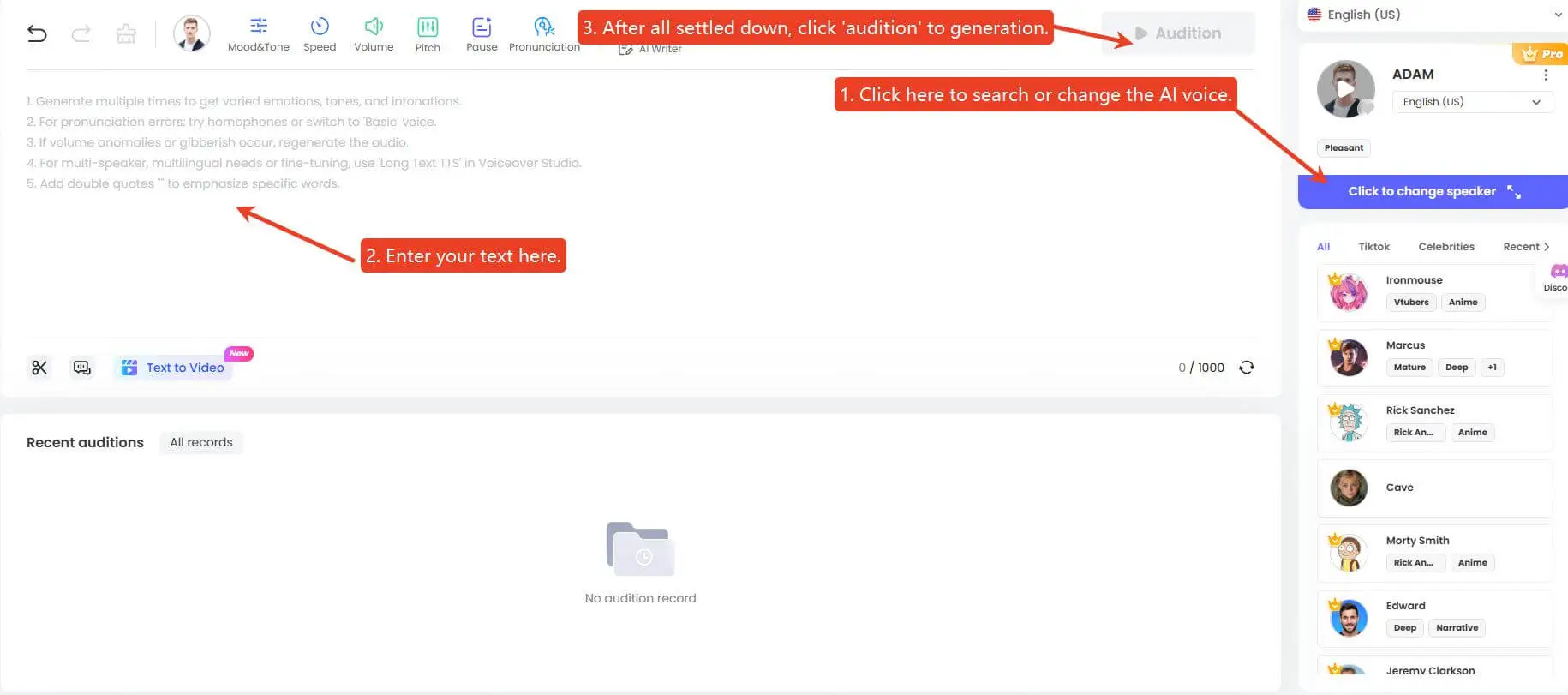
Step 4: After confirming the voice, click the Audition button to play or download the audio in ai voice in real-time.
Step 5: Further, if you want to edit your history audios, go to the "My creation" section to rename, play and delete the audio.
Bonus Tips: What if I don't find the AI voice I want? You can clone your own AI voice using our voice cloning tool below.
How to Make Your Own AI Voice Model:
Step 1: Simply click the button below to go to TopMediai voice cloning feature.
Secure Visit
Step 2: Choose the method you like: Upload Audio, Record Your Voice or Design a New Voice.
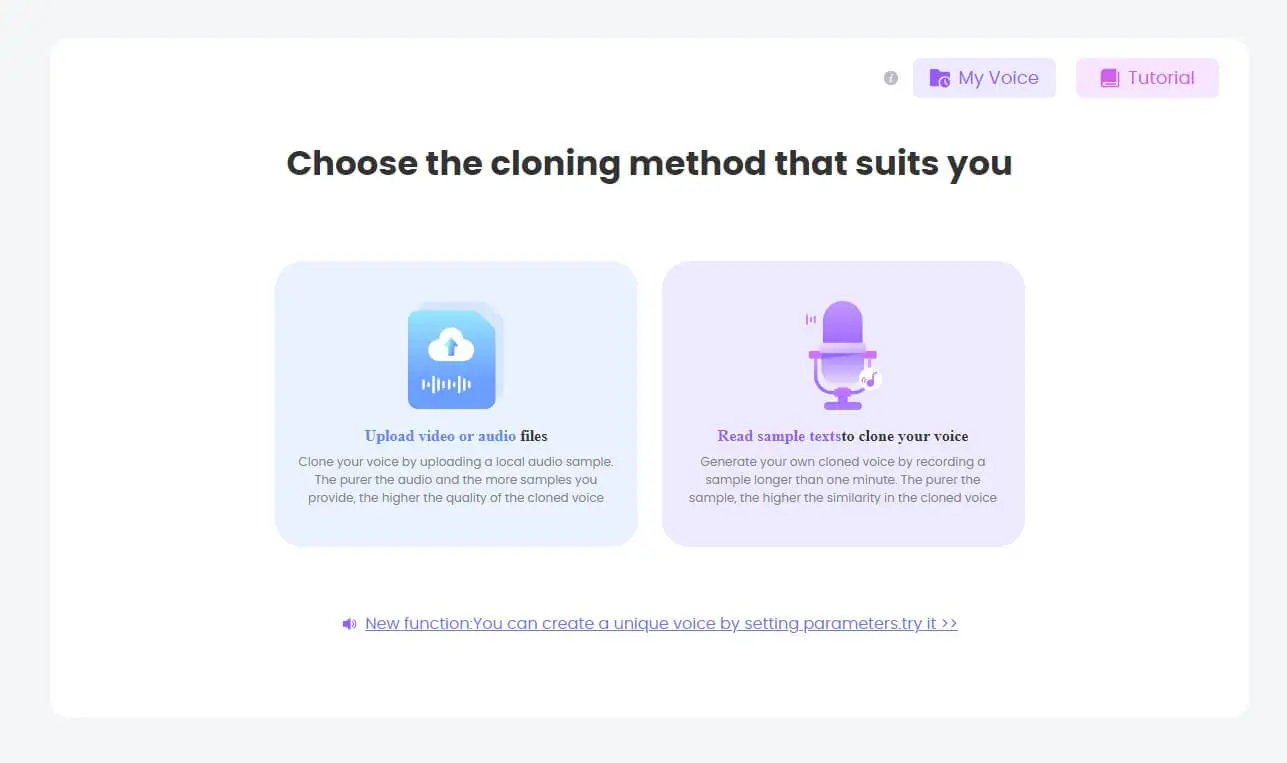
Step 3: Now, start AI voice cloning.
Step 4: When the voice cloning is done, choose the version you prefer. Then you can use this voice directly with our advanced text to speech technology.

- User-friendly interface makes it easy to use.
- Customizable controls allow for greater voice flexibility.
- Offers a wide variety of languages and accents.
- Can generate a variety of voices to match the language and emotion of your content.
- Please make sure your internet connection is good enough.
Part 3: How to Use TopMediai to Create Viral Super Bowl Content?
1. Fan Reactions and Highlights: Turn every touchdown and big play into unforgettable moments with dynamic AI commentary.
2. Social Media Content: Make TikTok, Instagram, and YouTube clips that stand out and go viral.
3. Podcasts and Recaps: Deliver engaging, high-energy audio for sports podcasts that capture the excitement of the game.
4. Want to recreate the most thrilling Super Bowl moments? With TopMediai’s Mimic Motion feature, you can insert yourself directly into the action and become the star of the video.
5. Plus, our AI Music Generator lets you craft your own Super Bowl-themed soundtrack, giving your content the perfect hype and energy to dominate feeds.
Part 4: HOT FAQs about Super Bowl AI Voice
1 Can I make money with Super Bowl AI Voice?
Yes! Most voices on TopMediai support commercial use, so you can monetize your Super Bowl content, TikToks, podcasts, or marketing campaigns without worry.
2 Can I combine Super Bowl AI Voice with other TopMediai tools?
Absolutely! Amp up your content by pairing AI voice narration with Mimic Motion to insert yourself into highlights, or AI Music Generator to create hype-filled Super Bowl soundtracks—your videos will look and sound like a full-on production.
3 Do I need multiple plans to access all tools?
Nope! One plan unlocks everything—all TopMediai products are ready to use under a single subscription.
Conclusion This Super Bowl AI voice generator isn’t just a tool—it’s your secret weapon to explode on social media, wow fans, and make your content unforgettable. With TopMediai Text-to-Speech, you don’t just narrate—you command attention, hype the crowd, and own the Super Bowl.
Secure Visit

-

February 24, 2026
TopMediai Coupon Code: Save on All AI Tools with One Plan -

January 26, 2026
Best Santa Video for Kids in 2026: Create Magical Christmas Messages -

January 26, 2026
How to Use Grok Imagine: Free Tutorials & Best Alternatives -

January 26, 2026
Best 5 AI News Generators to Produce News Articles & Videos -

January 26, 2026
Best 6 AI Wedding Video Generators : Create Perfect Wedding Videos
Recent Blogs


