


 Video Generation Types
 Supported AI Models
 AI Video Effects



 AI Video Tools
 AI Music Tools
 AI Voiceover Tools
 More Features
 API for Music-related Services
 API for Voiceover-related Services

 TopMediai's API Documentation:

 Help&Support
 Popular Tips


 Join our Discord!

 Text to Speech


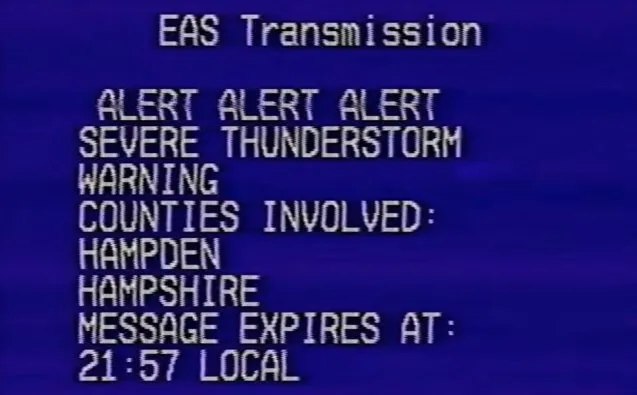
The EAS Maker helps deliver urgent alerts quickly and clearly in critical situations. Combined with an EAS Voice Generator powered by AI, the Emergency Alert System ensures messages reach wide audiences with clarity and authority. Now, let's dive into this blog to discover how it all works.
Secure Visit
- Part 1: What is EAS Voice Generator?
- Part 2: How to Make EAS Text to Speech?
- Part 3: Suggestions for Emergency Alert System Voice
- Part 4: Hot FAQs about EAS Voice Generator
Part 2: What is EAS Voice Generator?
1. Info of EAS Voice Generator
EAS voice generator is a tool used to create the audible voice messages that are broadcasted during Emergency Alert System (EAS) alerts. It allows users to generate synthetic voices that sound like real human voices, which are then used to deliver important emergency information to the public.
The EAS voice generator simplifies the process of creating voice messages by providing a user-friendly interface and customizable options for selecting the voice type, tone, and other parameters. This ensures that the emergency messages are clear, impactful, and easily understandable by the recipients.
Everyone could make different types of voice on EAS voice generator.

2. What can EAS Voice Generator Do with EAS Maker?
These 2 tools simplify the process of creating and distributing emergency alerts, ensuring that critical information reaches a wide audience in a clear and impactful manner. With the EAS voice generator, you can change the alert voice generated by EAS Maker into a lifelike voice alert for emergencies and more, alerts can be made more unique and reminding.
Part 2: How to Make EAS Text to Speech?
TopMediai Text to Speech - Best EAS Voice Generator
TopMediai Text to Speech is a powerful and reliable EAS voice generator that offers high-quality and natural-sounding voiceslike an adults' or child's voice for creating Emergency Alert System (EAS) messages. It is considered one of the best EAS voice generators available in the market.
With its user-friendly interface and advanced features, TopMediai Text to Speech simplifies the process of converting text into speech for use in emergency alerts.

Using TopMediai Text to Speech, you can select from a wide range of voices. These voices are designed to sound clear, authoritative, and attention-grabbing, ensuring that the emergency information is communicated effectively to the target audience.
Most AI voices support commercial use.
Supports cloning of your own voice model.
Realistic and Unique Voices: TopMediai TTS boasts 3200+ lifelike voices in 190 languages for diverse, effective emergency alerts.
Voice Cloning: TopMediai TTS enables custom voice creation to align with your brand or organization.
Seamless EAS Maker Integration: Easily produce top-notch emergency alert audio with TopMediai TTS and EAS Maker.
Tailored Customization: Customize tone, pitch, and speed with TopMediai TTS for messages that match your exact requirements.
Crystal-Clear Audio: TopMediai TTS delivers high-quality, intelligible audio for effective information dissemination.
To make EAS text-to-speech using TopMediai Text to Speech, follow these steps:
Step 1: Go to the TopMediai Text to Speech officiall website.
Secure Visit
Step 2: Directly search and select the eas voice.
Step 3: Put or paste down your text in the given box.
Step 4: Click the Audition button to get the audio with EAS Maker.
Step 5: Once you have generated the audio, you can import it into EAS Maker or any other EAS message creation tools or software.
Try Best EAS Text to Speech Online >>
Part 3: Suggestions for Emergency Alert System Voice
1. Keep messages clear, concise, and to the point.
2. Use a calm but authoritative tone to convey urgency.
3. Test the voice in various scenarios to ensure audibility and effectiveness.
Related Read:
Unleash Your Creativity to Make AI Singing with AI Singer Generator
Free AI Song Cover Generator with Your Favorite Artists' Voice [Tutorial Included]
4 Best AI Celebrity Voice Changer Comparison [Online/PC/Mobile]
Part 4: Hot FAQs about EAS Voice Generator
1 How does an EAS Generator work?
An EAS generator creates simulated emergency alerts by combining audio tones, messages, and the EAS voice. Users simply enter custom text, and the tool generates a realistic alert-style output.
2 Can I use an EAS Alert Generator for real emergencies?
No. An EAS alert generator is designed for educational, entertainment, and demonstration purposes only. Real emergency alerts are strictly managed by government authorities.
3 Is the EAS Voice Generator free to use?
Yes!TopMediai EAS voice generator offer 1000 free characters for new users.
Conclusion
Using an EAS Voice Generator with tools like TopMediai Text to Speech enhances emergency alerts with clear, natural-sounding messages. This helps people understand critical information quickly and respond safely.
Strengthen your emergency communication with the EAS maker. Stay informed. Stay safe.
Secure Visit

-

February 24, 2026
TopMediai Coupon Code: Save on All AI Tools with One Plan -

January 29, 2026
Super Bowl AI Voice: Create Viral Game-Day Content -

January 26, 2026
Best Santa Video for Kids in 2026: Create Magical Christmas Messages -

January 26, 2026
How to Use Grok Imagine: Free Tutorials & Best Alternatives -

January 26, 2026
Best 5 AI News Generators to Produce News Articles & Videos
Recent Blogs


