


 Video Generation Types
 Supported AI Models
 AI Video Effects



 AI Video Tools
 AI Music Tools
 AI Voiceover Tools
 More Features
 API for Music-related Services
 API for Voiceover-related Services

 TopMediai's API Documentation:

 Help&Support
 Popular Tips


 Join our Discord!

 Text to Speech


In the digital age, content creation has become a vital part of online communication. With the popularity of YouTube, YouTuber AI voice generator has gained traction among aspiring creators who want to emulate their favorite YouTubers' unique voices.
This article will guide you on the most popular AI YouTuber voice, how to use a text to speech YouTubers AI to convert text into speech and create engaging content.
No need to sign up
- Part 1: Want to Text to Speech with YouTuber AI Voice?
- Part 2: Best YouTuber AI Voice Generator for Text to Speech
- Part 3: YouTube Voice AI for Making YouTube Shorts Easily!
- Part 4: FAQs about YouTuber AI Voice Generator
Part 1: Want to Text to Speech with YouTuber AI Voice?
Are you fascinated by the distinct voices of your favorite YouTubers and wish to incorporate their style into your own content? With the right tools, you can now achieve this effortlessly.

By using a YouTuber voices generator, you can convert your written text into a speech that closely mimics the voice of your chosen YouTuber. This opens up new possibilities for content creators who seek to add a personal touch to their videos or audio content.
Part 2: Best YouTuber AI Voice Generator for Text to Speech
1 TopMediai Text to Speech - Easily Generate YouTuber AI Voice
TopMediai text to speech is an online YouTuber voice generator that transforms written text into spoken words. Users can create and personalize voices to achieve unique, expressive tones suitable for online content.

By using this YouTuber-style AI voice tool, creators can make their projects more engaging and memorable. TopMediai Text to Speech streamlines audio production, removing the need for expensive equipment or professional voice actors.
Experience the power of over 3200 voices in 190+ languages&accents.
Super cost-effective.
Supports cloning of your own voice model.
Adjust voice parameters for better voice effects.
24/7 customer support service.
Provides API for seamless app and website integration.
- 190+ languages and accents.
- Easily delete records for simple work.
- No need to download and install for online use.
- Multiple voice categories provide users with diverse choices.
- Support multi-person dubbing projects.
- Reduce video dubbing costs.
- Online version only.
Easy steps to generate YouTubers AI voice:
Step 1: Open TopMediai Text to Speech and free to try it online.
Secure Visit
Step 2: Choose the AI voice style you like. You can enter a name or keyword to find a voice with a similar tone or personality for your content.
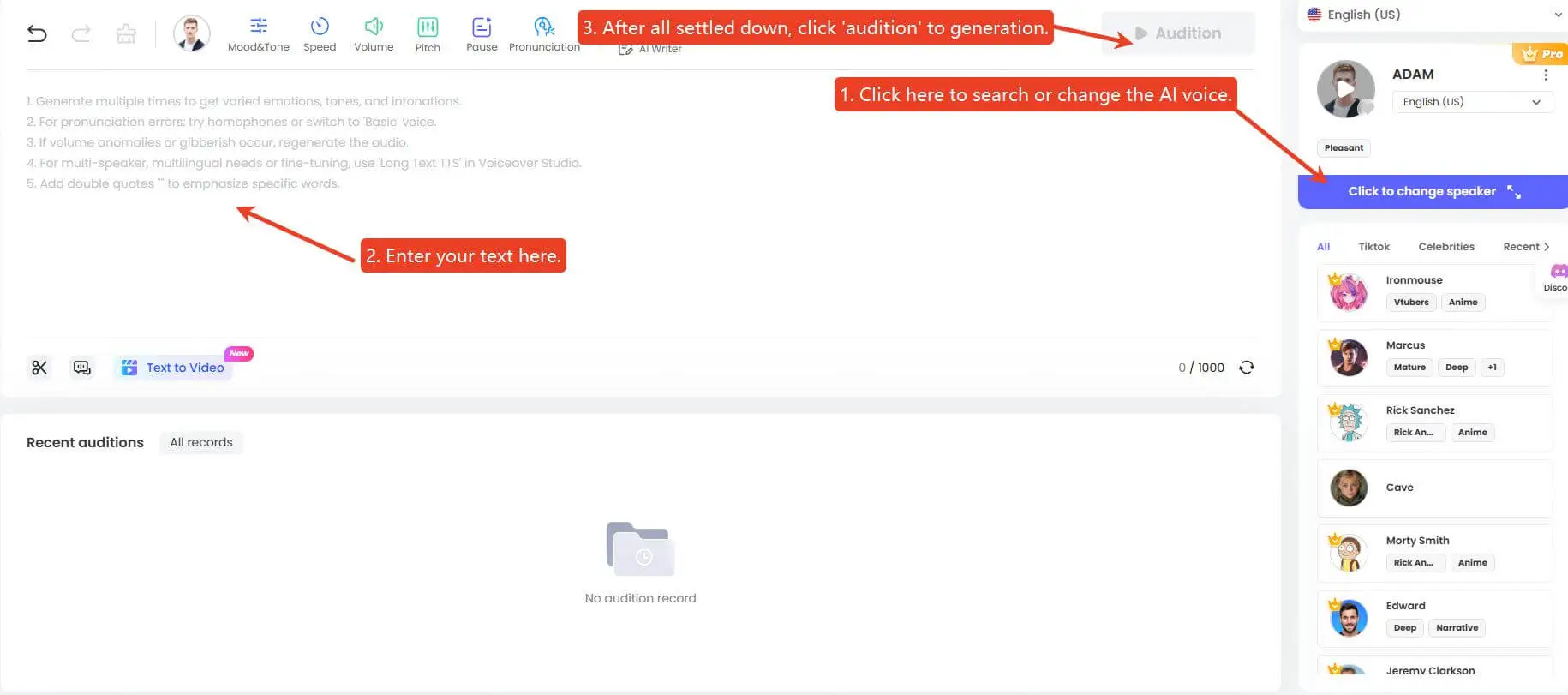
Step 3: Enter your desired text into the text box provided.
Step 4: Click "Generate Speech" to generate your YouTubers AI voice audio file.
Part 3: YouTube Voice AI for Making YouTube Shorts Easily!
YouTube Shorts are 60-second vertical videos that boost visibility, engagement, and growth, making them a powerful tool for creators to connect with wider audiences.
Creating engaging YouTube Shorts is quick and easy, especially with the help of TopMediai Text to Speech for professional voiceovers.

Create captivating Shorts in a few simple steps:
Step 1: Plan Your Content
Choose a topic that resonates with your audience and fits the 60-second limit.
Outline your script to ensure clarity and impact within the short time frame.
Step 2: Create Your Video
Use your smartphone or editing software to record or compile clips for your video.
Keep the content visually dynamic with quick transitions, bold captions, and engaging visuals to capture attention.
Step 3: Use TopMediai Text to Speech for Voiceover
Write Your Script: Craft a concise and engaging script for your video.
Sign in to TopMediai: Log in to the TopMediai Text to Speech platform.
Select a Voice: Choose from a variety of natural-sounding YouTube shorts AI voice in multiple languages and accents.
Customize Settings: Adjust pitch, speed, and tone to fit your video's mood and style.
Generate Audio: Convert your script into a high-quality voiceover and download the audio file.

TopMediai AI Writing
Use TopMediai AI writing tools to let AI generated your YouTube script, high-quality prompt, scripts, dialogues, program outlines and promotional copy.
Step 4: Edit and Finalize
Import the voiceover and sync it with your visuals using video editing software.
Add music, captions, and effects to make your video more engaging.
Step 5: Upload Your YouTube Shorts
Go to YouTube, select the "Create" button, and upload your Shorts video.
Optimize the title, description, and tags to reach a broader audience.
Tips: Using TopMediai AI Video Generator, you can create professional, attention-grabbing YouTube Shorts effortlessly, helping your content stand out in a crowded digital space. Get started today and take your Shorts to the next level!
Part 4: FAQs about YouTuber AI Voice Generator
1 Are there any limitations to using YouTuber voice AI generators?
You need to have a good internet connection to use it, otherwise there are no other restrictions. Topmediai is available on both cell phones and computers.
2 Is it legal to make videos with generating AI YouTubers Voice?
Yes, it is legal to make videos with generated AI voices for YouTube. However, there are several factors and caveats that you must consider before coupling AI voices with your YouTube content.
This includes obtaining all necessary rights for the commercial use of visual and audio elements, following YouTube's Community Guidelines, and ensuring that the content is original and non-repetitious.
3 How can I get YouTuber AI voice?
To get a YouTuber AI voice, you can use text-to-speech (TTS) websites or services like TopMediai Text to Speech, Uberduck, Speechify. These tools allow you to convert text into a synthetic voice for your videos. Choose one that suits your needs and integrate it into your video editing process.
Other YouTube Tips:
Best AI YouTube Shorts Makers to Create Engaging Videos
ConclusionGenerating AI voices of your favorite YouTubers is a fun and creative way to add some personality to your content. With the help of tools like TopMediai Text to Speech, a powerful YouTuber AI voice generator, you can now easily and accurately generate AI YouTuber voice.
So why not give it a try and see what kind of creative content you can come up with?
TopMediai Text to Speech
Free AI-powered text to speech YouTuber voice generator you should try!

-

February 24, 2026
TopMediai Coupon Code: Save on All AI Tools with One Plan -

January 29, 2026
Super Bowl AI Voice: Create Viral Game-Day Content -

January 26, 2026
Best Santa Video for Kids in 2026: Create Magical Christmas Messages -

January 26, 2026
How to Use Grok Imagine: Free Tutorials & Best Alternatives -

January 26, 2026
Best 5 AI News Generators to Produce News Articles & Videos
Recent Blogs


