


 Join our Discord!

FOR KIDS BY NAME
A Santa Voice Message for Kids
Give Santa a first name and a detail the child will recognize, like the star they folded for the tree. Load the script, then swap in your own detail.
Use the personalized Santa script
 20% off
Give Santa a name, one real detail, and a short Christmas wish. Create a spoken greeting with soft holiday music for a child, your family, or a Secret Santa party.


Pick a greeting for Christmas Eve, a family surprise, or a Secret Santa gift swap.
Give Santa a first name and a detail the child will recognize, like the star they folded for the tree. Load the script, then swap in your own detail.
Use the personalized Santa script
Play a short Santa voicemail before bedtime on Christmas Eve. Use a name, one thing Santa remembers, and a simple goodnight.
Find the Christmas Eve preset
Turn a team name and an inside joke into a short Santa party welcome. Play it before the gifts are opened or put it over a holiday video opener.
Use the Secret Santa script
Give each child one line and one moment of their own. Santa thanks Leo for untangling the lights and Mia for saving a cookie for a neighbor.
Create a Santa message for siblingsCopy a script or load it into Custom with its voice and music settings. Swap in your own names and details.
Replace Emma and the paper star with a first name and one detail the child will recognize. Keep the greeting, detail, and wish in separate groups.
Ho, ho, ho.
Hi, Emma!
I heard you made a paper star for the tree.
The one with the crooked point.
That made me smile.
Merry Christmas, Emma.
From all of us at the North Pole.
Replace the team name and green mug with a joke your group already knows. Give the punch line its own line.
Ho, ho, ho.
Hello, design team!
I hear the same green mug is back in the gift swap.
Again.
All right.
Let’s find out who gets it this year.
Merry Christmas, everyone!
Start with a short script in Custom. Bring a reference or a holiday photo when you want to shape the backing music.
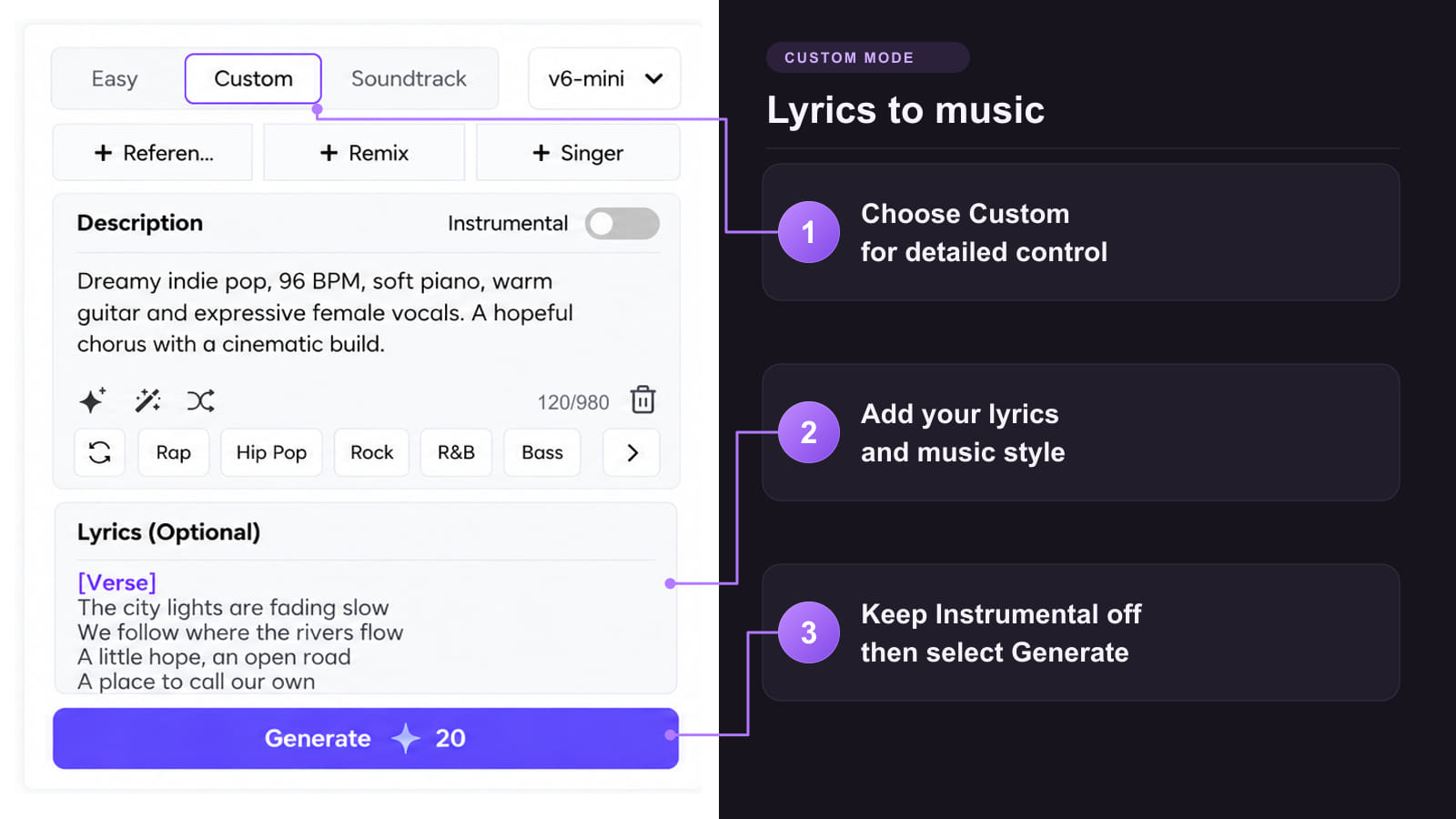
Method 1: Start with a short Santa script
Method 2: Use an audio reference to shape the music

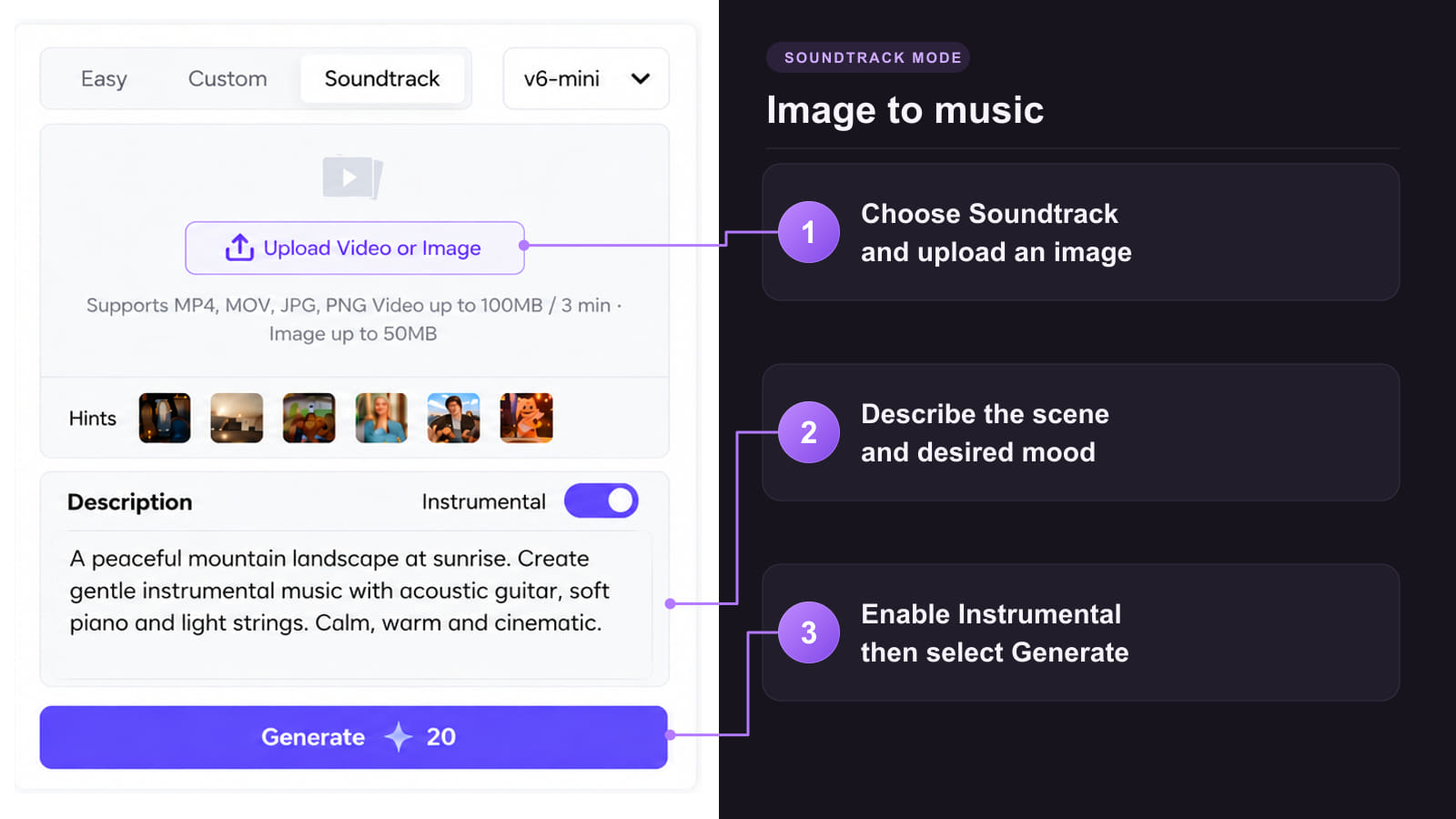
Method 3: Use a holiday photo to inspire a music bed

A name and one specific detail give Santa something personal to say.
 Put the name near the start
Give the first name a short line so you can hear and check the pronunciation straight away.
 Tell one small story
Mention the paper star, the note for the reindeer, or the gift the team sees every year.
 Give the script room to breathe
Break the greeting into short groups. Give each sibling a separate line or leave a little room for a joke to land.
 Keep the backing music quiet
Use a sparse instrumental beneath the words and place any sleigh-bell flourish after the closing wish.
 Preview how it sounds on a phone
Check that the name and the detail are easy to hear before playing it for the family or at a party.
Choose by who will hear it and when you want to play it.
| What you’re making | Format to try | What to start with |
|---|---|---|
| A Santa message for kids by name | A spoken greeting over quiet Christmas music. | One first name, one detail that feels real, and a short wish. |
| A Christmas Eve Santa voicemail | A short prerecorded message to play before bedtime. | A first name, something Santa remembers, and a simple goodnight. |
| A Secret Santa party opener | A Santa voiceover with a quiet festive sting after the final line. | Your group or team name, one inside joke, and when to start the gift swap. |
| A Santa message for siblings | One greeting with a separate spoken section for each child. | Each child’s first name and one detail of their own. |
| A Santa Claus voice with no music | Choose the Santa Claus voice in Text to Speech. | A short script and the pronunciation of any unfamiliar names. |
Keep the Santa take with the clearest name and personal detail. Use it as the soundtrack for a family card or the first line of a gift-swap clip.
Upload a holiday photo to TopMediai Image to Video and give it a gentle motion brief. In your video editor, put your finished greeting under the clip and leave enough time to hear the last wish.
Use a photo of the gift table or a still of the wrapped present. Open the AI Santa video guide for visual ideas. Place the Santa party take on your video timeline and time the gift reveal to the pause after the joke.
Keep the Santa take for your greeting and make any extra music or visuals it needs.
Pair a holiday song with footage for a short music-led Christmas clip.
Explore Tool
Build a storyboard around a separate Christmas song or instrumental.
Explore Tool
Convert a supported piano cue to editable MIDI if you want to rearrange the backing.
Explore Tool
Separate the voice and accompaniment in a supported track for a different mix.
Explore Tool
Use a permitted portrait and a separate song to create a singing Christmas card.
Explore Tool
Try a different singing voice on a separate holiday song with audio you can use.
Explore ToolChoose a holiday tool or find a guide for the next step in your project.
Get a clear name read, a natural pause, and the right amount of Christmas music.
Create a Santa Voice MessageStart with their first name, then mention one real detail and add a short Christmas wish. A crooked paper star they made is easier to picture than a list of achievements.
Put the name on a short line and preview it. If it needs work, try a phonetic guide in Description and compare another take. For finer voice control, try the Santa Claus voice in Text to Speech.
Yes. Open the Santa Claus Voice Store, choose the Santa voice in Text to Speech, and enter your greeting. Preview the name and any unusual words before you share it.
It’s a prerecorded Christmas greeting you can play before bedtime or send to someone. Start with the first name, add one detail Santa remembers, and finish with a short goodnight.
Ask for a very quiet instrumental bed and move sleigh bells to the end. Listen on a phone speaker. If words get buried, try fewer instruments or mix the voice and music on separate tracks.
Yes. Give Santa the team name and one shared joke, such as the mug that keeps returning to the gift swap. Put the punch line on its own line so there is room for a pause.
Use Custom with Instrumental off. Put short spoken lines in Lyrics and specify one voice and a conversational pace in Description. If it starts singing, simplify the backing music and compare another take.
Give each child a separate paragraph with their name and one detail. Put a pause between the two greetings, then preview the order and the names before you share it.
Yes. Make a short clip from a holiday photo or gift-swap still, then put your finished Santa audio on the video timeline. Check that the name and final line stay clear in the cut.