


 Join our Discord!

Vale in the Mix
Put Your DJ Name on a Recorded Mix
Swap Vale for your stage name and drop the line into a gap before the next vocal.
Listen and make a similar song
 20% off
Give your mix a DJ name drop, sing your radio show name, or get the crowd clapping on cue. Try a DJ jingle maker preset and make the sound your own.


Tag a mix before it gets shared, open Friday night's show, cue a room full of dancers, or carry the last vocal into the next track.
Swap Vale for your stage name and drop the line into a gap before the next vocal.
Listen and make a similar song
Give the singers your show name and use the same little tune to open each episode.
Listen and make a similar song
Pick one action your crowd can follow and leave enough beats for everyone to answer.
Listen and make a similar song
Match the fill to the tempo of your set and let the incoming kick take the next downbeat.
Listen and make a similar songWhat should the listener know or do when the cue ends?
| What you want listeners to do | Sound to make | Start with |
|---|---|---|
| Recognize the DJ in a mix someone shared | A short spoken name drop over an existing beat | Your stage name and how you say it. For a voice-only file, open DJ Voice Maker. |
| Recognize a show before the host speaks | A sung show ID with a repeatable tune | Your show's name and the mood of its opening minute. |
| Clap along with the room | A one-line MC call followed by space to respond | One clear action and the number of beats the crowd needs. |
| Follow the jump into the next track | A drum fill that clears the next downbeat | The tempo of your set and the beat where the next kick lands. |
Load a line into Custom to change the words and keep the delivery that goes with it.
Try calling this while tapping the beat. Give the dancers time to clap twice before the next lyric comes in.
Two claps!
Sing your show's name aloud. Put the syllable you naturally stress on the strongest note and let the last word end before the host comes in.
Night Shift Radio.
Start with the words you want people to hear, a recording of how you say them, or a visual from your next show.
Method 1: Start with a DJ name or a line of your own
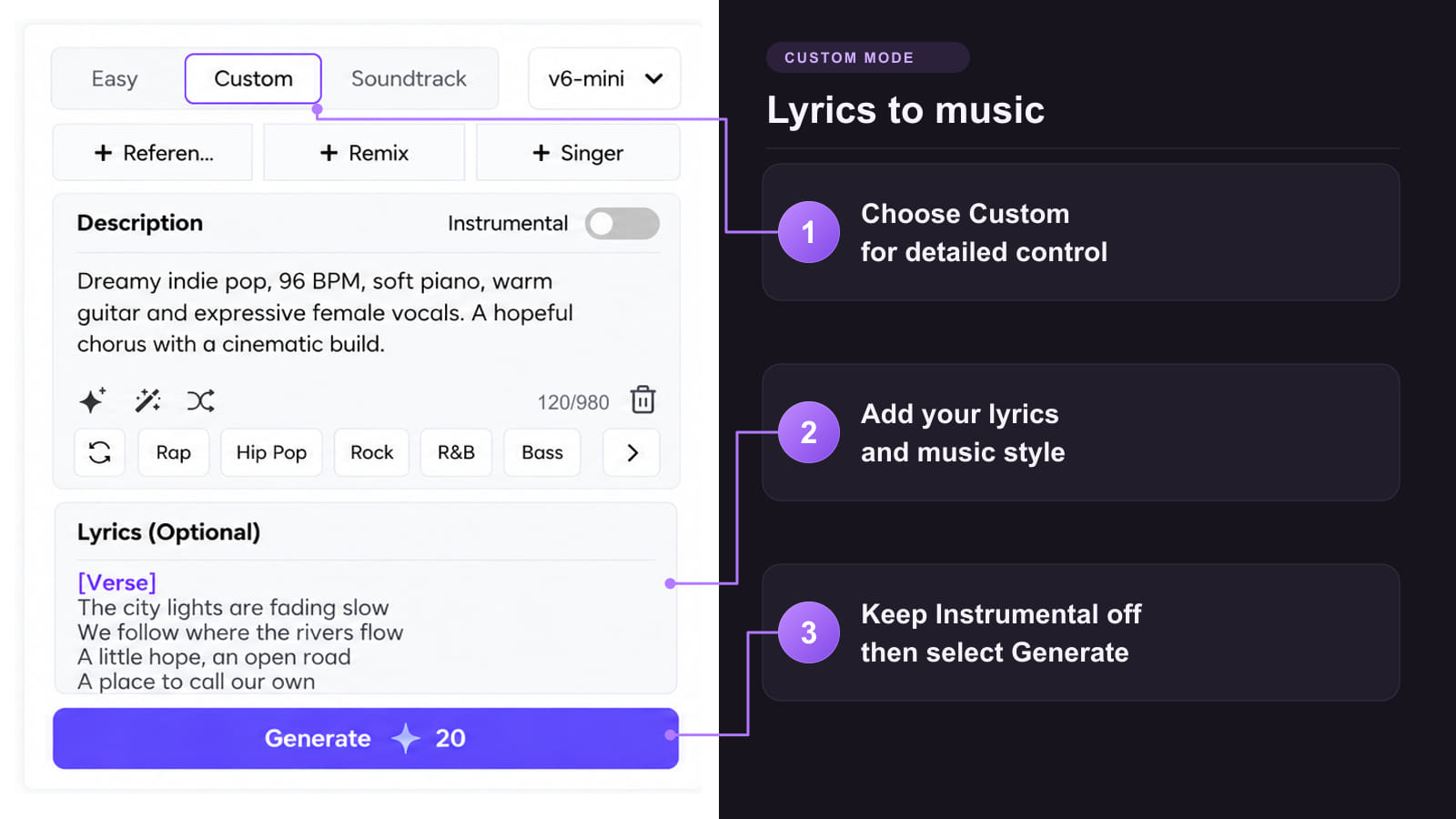
Method 2: Use your voice or hummed melody as a reference

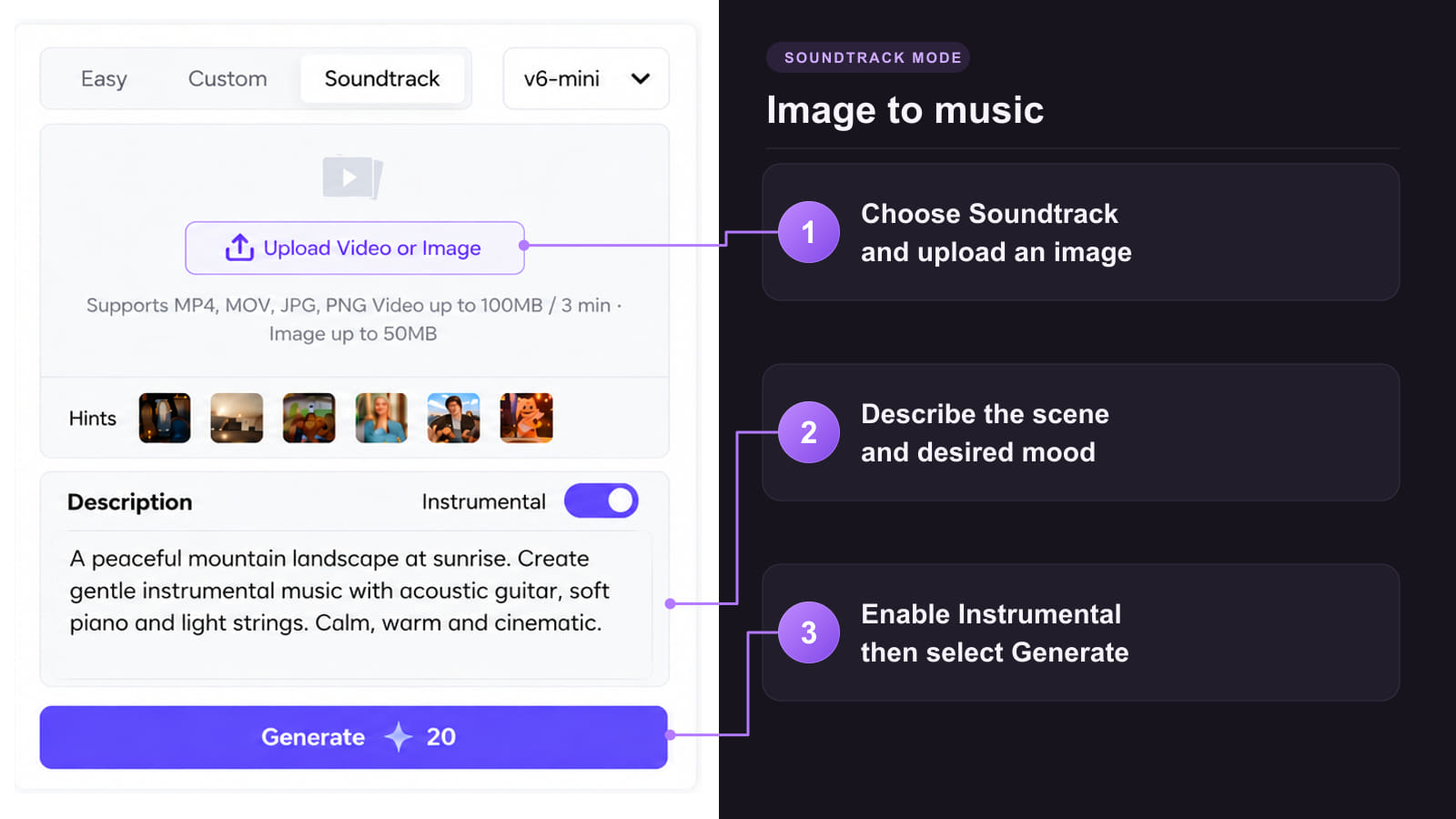
Method 3: Score a gig poster or a show teaser

Rehearse each cue with the audio immediately before and after it.
 Hear the whole stage name
Play the tag over a busy beat. If the scratch masks the first syllable, move the tag into a gap between drum hits.
 Recognize the show from its first notes
Use the same opening tune each week. Play it for a regular listener and see how soon they can name the show.
 Give the room time to answer
Clap along to the MC cue yourself. If the chorus starts before your second clap, trigger the call earlier.
 Give the incoming kick a clear downbeat
Listen to the snare tail against the next track. End the fill just before the kick so the new track lands cleanly.
 Keep a tag ready for the next mix
Save the cleanest take under your stage name. Check its level against the new track each time you reuse it.
On stage, the cue has to land when you hit the pad. In a recorded mix, you can place it against the exact beat you want to keep.
Drag the audio file from your Serato DJ Pro library into an empty sampler slot. Set the slot volume while the track is playing in rehearsal. For a crowd cue, fire it early enough to leave both response beats before the chorus returns.
Find the first kick you want to keep in the incoming track. Work backward from that beat and place the end of your drum fill just ahead of it. Play through from the last vocal line of the outgoing song so you can hear whether the fill clips a word or lands on top of the new kick.
Carry the same sound from the broadcast into the clip listeners see before the show.
Use the sung show name as the soundtrack to a teaser. Bring up the episode artwork as the singers finish the name.
Create a music video
Animate a portrait of your host singing the station ID for an episode announcement.
Animate a photo
Separate the backing music from the sung ID so the host can introduce the guest over the instrumental.
Separate tracks
Pull the clearest call from a longer crowd take and cut a social clip around the audience response.
Explore Music Hooks
Bring the notes of your show hook into your DAW and try them on the synth you use for your live set.
Explore audio to MIDI
Try an authorized second voice on your original sung ID and choose the take that fits the show.
Explore AI coversFind a dry spoken voice, build an opening theme or set up a sampler pad for your next set.
Get the name right, fit the drop into your set and check where you can use it.
Make My DJ DropKeep your stage spelling in Title and write the name as it sounds in Lyrics. For Vale, add "one syllable, rhymes with sail" in Description. Play the line over your drums to check the pronunciation.
Yes. Open DJ Voice Maker for a spoken recording of your name. Save the dry take so you can set its level and add different effects for each mix.
Yes. Load the Night Shift Radio example, replace the line with your show name and sing it aloud once. If the name feels rushed, ask for a longer note on its stressed syllable.
The Vale in the Mix recording runs about 12 seconds. For a gap of just a beat or two, cue the name itself and trim the surrounding audio in your editor. Leave room for the next vocal.
Try the very start of the set or a natural break between sections. Listen through as a fan would. If the tag interrupts a lyric or the same transition twice, move or skip that cue.
Yes. Add the audio file to your Serato DJ Pro library, then drag it into an empty sampler slot. Trigger it in rehearsal to check the start point against the beat.
Lower the individual sample slot volume while a representative track is playing. Recheck the loudest syllable through the output you will use at the gig.
Check the license for the specific jingle before using it at a paid event. Free-plan music is for personal, noncommercial use. For a qualifying track generated during an eligible paid subscription, download its Commercial License PDF from TopMediai.
Your name drop identifies who mixed the set. Permission to use the recordings in that set is separate. Check the permissions for each recording and the rules of the platform or venue where you will play it.